Android
Open WODEX in Google Play to download and install the Android app.
Download onGoogle Play
To Log Out of Your Account in the App, Follow These Steps:

Important Note:

By following these steps, you will successfully log out of your account.
If you have any questions or encounter any issues, our support team is ready to assist you:
If You’ve Forgotten Your Password, Follow These Steps to Set a New One:
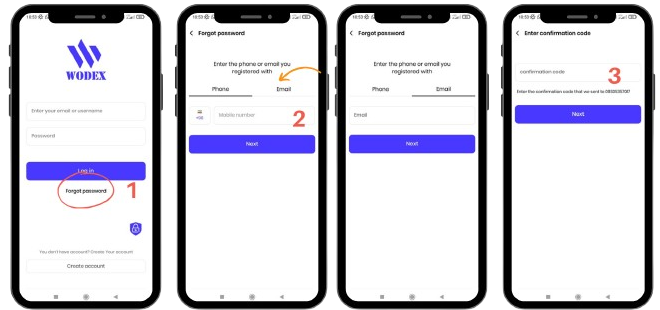
Step 3: Verify Your Information
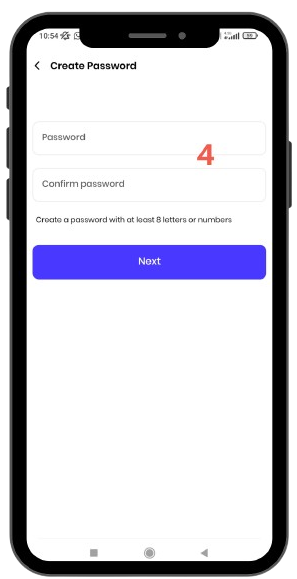
Password Requirements:
Note: Keep your password confidential and do not share it with others.
Support
If you encounter any issues at any step, our support team is ready to assist you:
Returning to the app is quick and easy! 😊
The WODEX app is completely free and available to all users. By installing this app, you can easily take advantage of our various features and services. Please read the guide on how to download the app.


Step 2: Entering Your Email or Phone Number
Note: When entering your phone number, make sure to include the correct country code (e.g., +98).

Step 4: Setting a Password
Note: Do not share your password with others.
Note: Your username is unique to each user, and your friends will be able to find you by searching for your username.
Step 6: Choosing a Profile Picture
Step 7: Completing Registration
If you encounter any issues at any step, our support team is ready to assist you. 😊
Plan your workouts, learn proper movement technique, and connect with the WODEX fitness community.
Choose your device’s app store to continue.
Open WODEX in Google Play to download and install the Android app.
Download onGoogle Play↗Open WODEX in the App Store on your iPhone and install the app on your device.
Download onApp Store↗ Sign in to your App Store account to install.Get the version for your device from one of the stores above.
Already have an account? Sign in with your existing details. Otherwise, create a new account.
Explore workout programs and movement guides, then plan your next session.
Quick answers about installing the app and signing in.
Choose App Store to open the WODEX download page for iPhone.
No. After installing, sign in with your existing account. If you have forgotten your password, choose the password recovery option on the sign-in screen.
Choose Create Account in the app. Follow our WODEX account creation guide for the steps.