
Create AHAP Workout
Complete Guide to Creating a AHAP Workout Program in the WODEX App
AHAP stands for As Heavy As Possible, a training method designed to maximize strength, muscular endurance, and athletic performance by lifting the heaviest possible weight in each exercise. This type of training focuses on pushing the body’s limits to build raw power and muscle resilience.
In the WODEX app, creating AHAP workout programs is straightforward, with precise customization options to tailor the intensity and volume of each exercise. Below, you’ll find a step-by-step guide to effectively design your AHAP workouts.
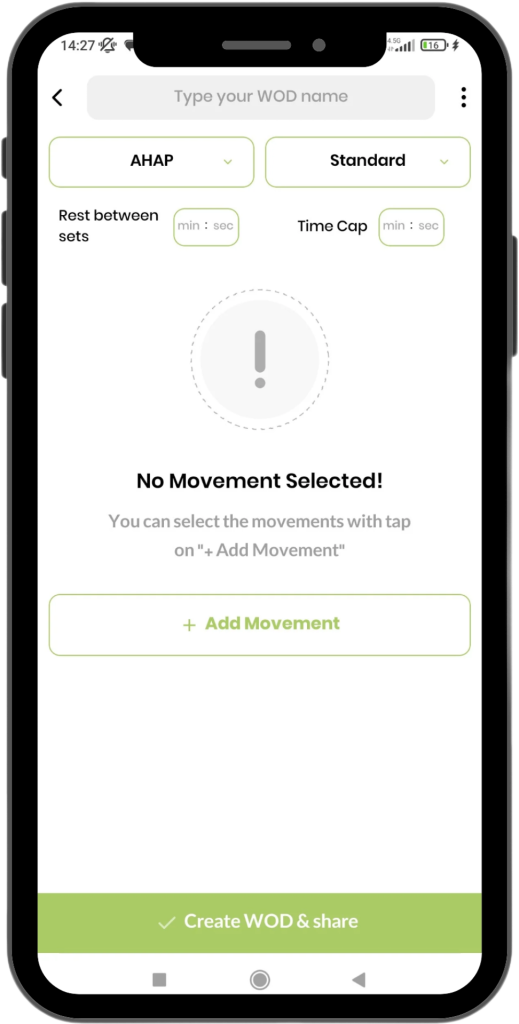
Initial Settings for AHAP Workouts in WODEX
When designing an AHAP workout in WODEX, there are two optional settings at the top of the page that allow you to further personalize the training experience:
1. Rest Between Sets
This option lets you specify the rest time between sets, helping ensure that athletes have enough recovery to perform their best during each heavy lift.
- Customizable in minutes and seconds.
Example:
Setting a 2-minute rest between each set can help improve recovery time and prepare the athlete for the next heavy set.
2. Time Cap
The Time Cap allows you to set a total time limit for the entire workout. This helps keep the workout focused and ensures athletes can manage their energy levels effectively.
- Customizable in minutes and seconds.
Example:
Setting a 15-minute time cap means the workout must be completed within that time frame, ensuring a controlled and efficient workout structure.
Types of Rep Schemes in AHAP Workouts
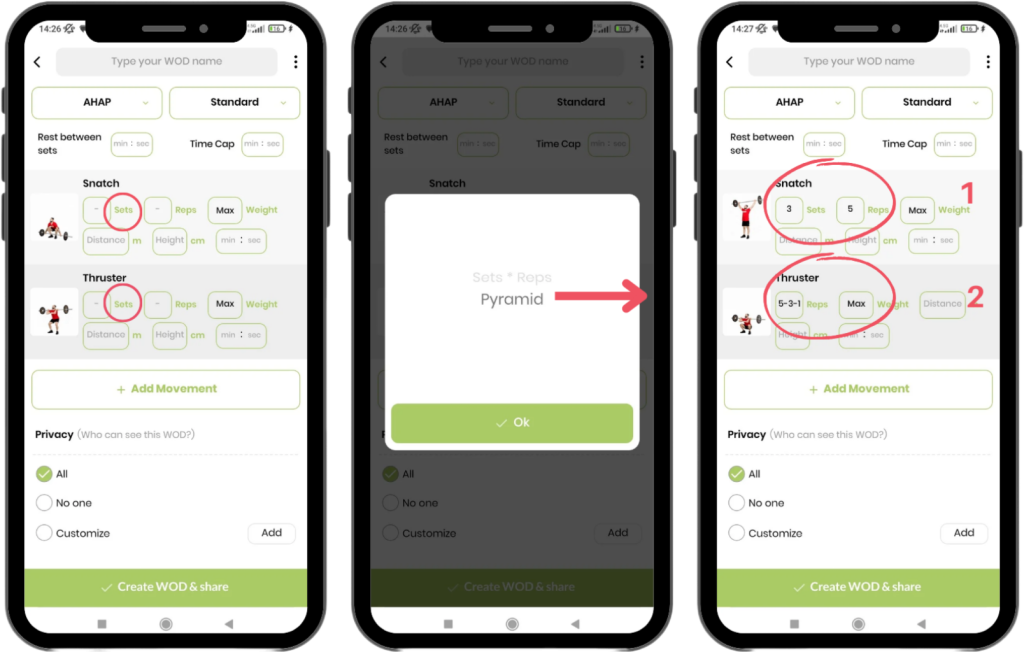
When designing AHAP (As Heavy As Possible) workouts, you have several options for how to structure repetitions and sets. Below are some of the most effective rep schemes for this type of training:
1. Sets × Reps
In this model, both the number of sets and the repetitions per set are fixed. This is the most straightforward approach for designing heavy lifting workouts.
- Example:
3 sets × 5 reps.
The athlete performs each set with the designated number of reps, aiming to increase the weight with each set. - How It Works:
This model focuses on a set amount of repetitions per set. The athlete works through each set, aiming to lift as heavy as possible while maintaining proper form. Increasing weight with each set ensures that the athlete is continually challenging their strength and working towards progressive overload.
2. Pyramid Model
The Pyramid scheme is ideal for when you want to vary the number of reps per set. This method increases intensity by reducing the number of reps while increasing the weight for each subsequent set.
- Example:
- Set 1: 5 reps
- Set 2: 3 reps
- Set 3: 1 rep
- How It Works:
In the Pyramid model, the athlete starts with a higher number of reps (at a lighter weight) and gradually decreases the reps as the weight increases. This approach is excellent for testing maximum strength while still allowing the body to gradually adjust to heavier weights. The athlete’s focus is on lifting as much weight as possible with fewer reps, which promotes strength development.
Features and Benefits of AHAP Workouts
1. Focus on Strength and Muscle Mass
AHAP workouts are designed to push athletes to their limits by performing exercises with the heaviest weight possible. This approach is excellent for building strength and increasing muscle mass, as it forces the body to adapt to progressively heavier loads.
2. Flexibility in Design
With AHAP, you can customize your workout by using various rep schemes (such as Sets × Reps or Pyramid) to keep your routine fresh and challenging. This flexibility allows you to tailor each session to your specific goals, ensuring that every workout is productive and engaging.
3. Personalization of Rest and Workout Time
AHAP programming allows you to adjust rest intervals between sets and establish a time cap for the entire workout. This enables you to customize your training to your fitness level and recovery needs, ensuring optimal performance and progression.
4. Gradual Improvement
As you track the weights used in each session, AHAP workouts promote gradual improvements. By consistently pushing yourself to lift heavier weights over time, your strength and endurance will noticeably increase, leading to impressive gains in both power and muscle size.
Key Considerations When Designing AHAP Workouts
1. Gradually Increase Weight
The core objective of AHAP workouts is to progressively overload the muscles by increasing the weight with each session. Focus on lifting heavier weights while maintaining good form, and ensure that you’re challenging yourself every time.
2. Maintain Proper Form
As you increase the weights, it’s essential to maintain proper form. Lifting excessively heavy weights at the expense of technique can lead to injury, so always prioritize safe movement patterns, especially when lifting near your maximum capacity.
3. Choose Weights Appropriate for Your Ability
While it’s important to challenge yourself, the weight used should still be appropriate for your current strength level. Select weights that are challenging but not so heavy that they compromise your technique or put you at risk of injury.
4. Prioritize Adequate Recovery
Ensure that you’re allowing adequate rest between sets to fully recover, especially when working with heavy weights. Additionally, incorporate sufficient rest days between AHAP workouts to promote muscle recovery and avoid overtraining.
Start Your AHAP Workouts with WODEX
With WODEX’s advanced features, you can now design your AHAP workouts with ease. Whether you’re looking to build strength or tackle new challenges in your fitness journey, AHAP programming is the perfect choice. Get started today and discover your true power! 💪
Create Interval Workout
Complete Guide to Creating a Interval Workout Program in the WODEX App
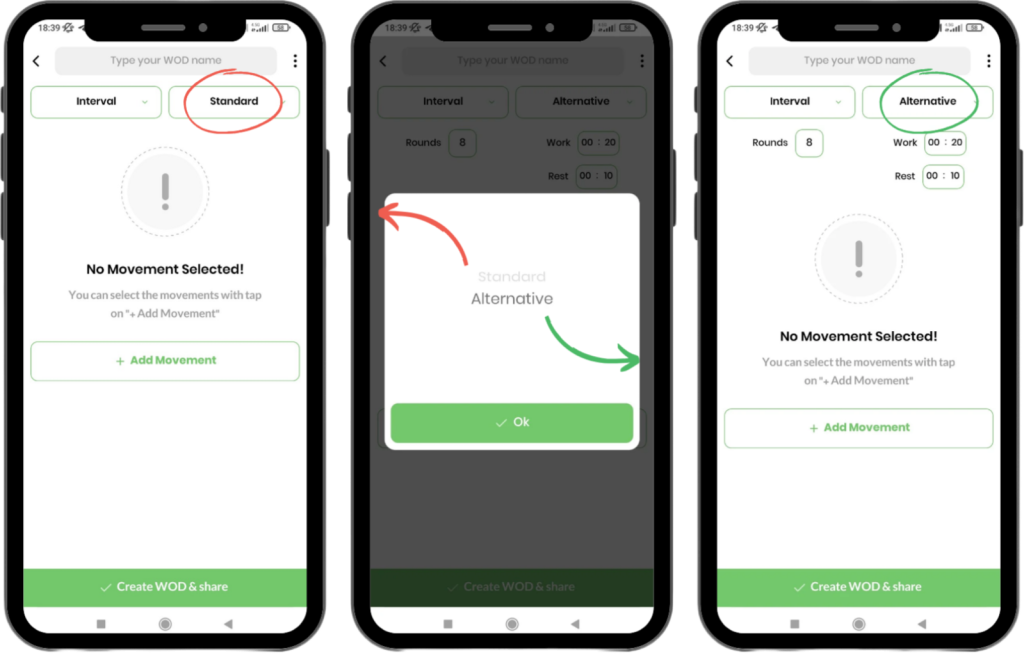
Interval Training is a powerful method that alternates between periods of high-intensity activity and rest. This type of workout is designed to enhance stamina, power, and overall athletic performance. It’s based on three key parameters:
1. Number of Rounds (Rounds)
The number of times the cycle of activity and rest is repeated. This parameter defines how many complete sets of activity-rest intervals you’ll perform during the workout.
2. Work Duration (Work)
The length of time you spend performing the exercise or activity in each cycle. The intensity of your performance during this time plays a significant role in achieving your fitness goals.
3. Rest Duration (Rest)
The amount of time allocated for recovery between each cycle. The rest period allows your body to recover and prepare for the next round of activity, ensuring optimal performance.
In the WODEX app, you can design Interval Training programs using two different modes:
- Standard Mode
- Alternative Mode
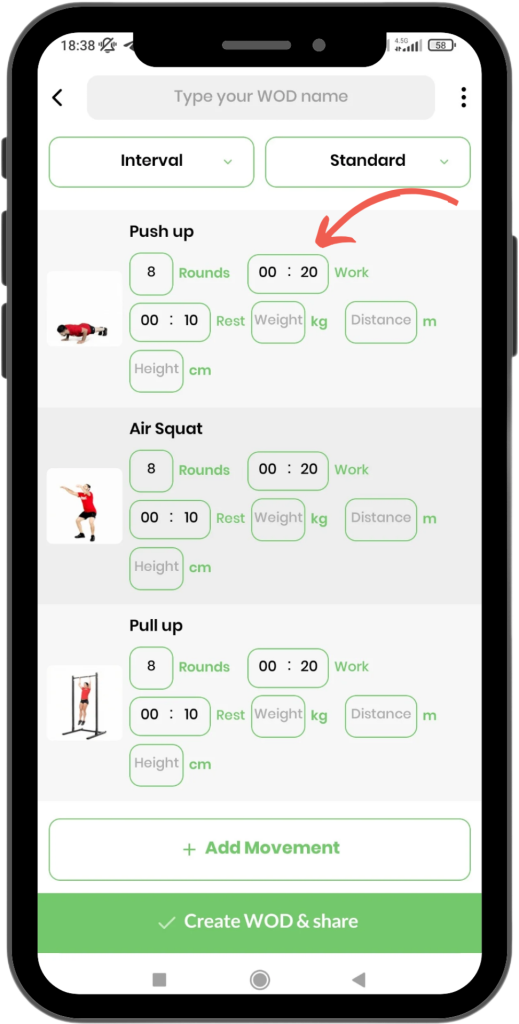
Standard Mode
This mode is ideal for workouts where each exercise is performed individually, and the current exercise must be completed before moving on to the next one.
How to Execute:
- Set Parameters for Each Exercise:
For each exercise, adjust the Rounds, Work, and Rest settings separately. This gives you full control over the duration of activity and rest periods for each movement.
- Work Phase:
The athlete starts by performing the exercise for the specified time in the Work section. For example, if the Work time is set to 30 seconds, they perform the exercise for that duration. - Rest Phase:
After completing the work phase, the athlete rests for the designated amount of time in the Rest section. This is the recovery period before moving on to the next round. - Repeat the Cycle:
The cycle of Work and Rest is repeated for the number of rounds specified in the Rounds section. After finishing all rounds for one exercise, the athlete moves on to the next exercise and repeats the same process.
Example Workout:
- Rounds: 8
- Work: 30 seconds
- Rest: 20 seconds
The athlete performs the first exercise for 30 seconds, followed by 20 seconds of rest. This cycle is repeated 8 times. Once all rounds are completed for the first exercise, the athlete moves on to the next exercise and repeats the process.
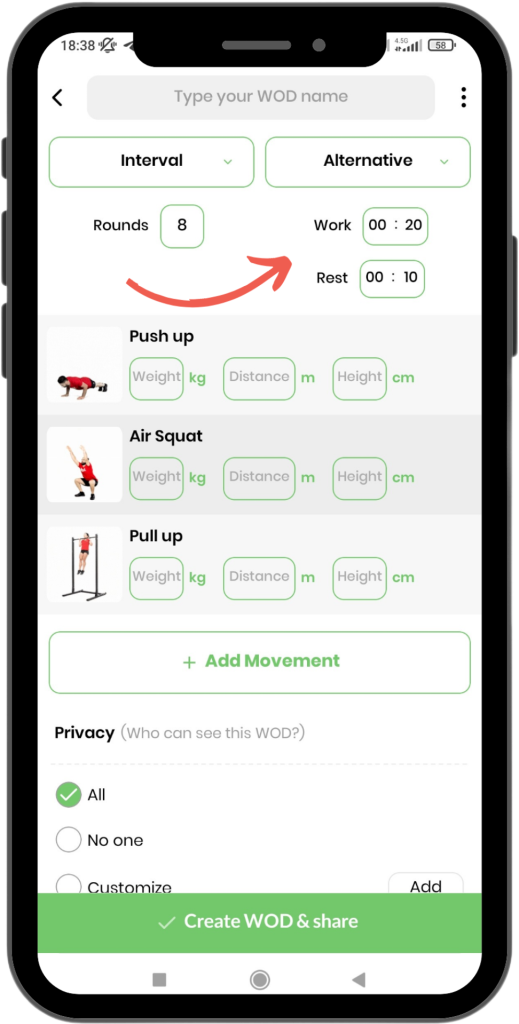
Alternative Mode
In this mode, the workout is designed to be completed as a continuous sequence, where the Work and Rest times are applied to the entire set of exercises.
How to Execute:
- Complete Workout Cycle:
A full cycle includes all the exercises in the workout, with rest periods between each exercise. The athlete performs the first exercise for the specified Work time, followed by a rest period as defined in the Rest section. - Work and Rest Phases:
The athlete works through each exercise, completing the set Work time followed by the Rest time. This sequence continues for all exercises in the program. - Repeat the Cycle:
After finishing all exercises in the workout, the cycle starts again from the first exercise. This continues until the specified Rounds count is completed.
Example Workout:
- Rounds: 8
- Work: 20 seconds
- Rest: 10 seconds
The athlete performs the first exercise for 20 seconds, followed by 10 seconds of rest. Then they proceed with the second exercise for 20 seconds, followed by another 10 seconds of rest, and so on. Once all exercises are completed, this cycle is repeated 8 times.
Advantages of Designing Interval Training with WODEX
- High Flexibility:
With WODEX, you can precisely adjust the Work and Rest times for each exercise or the entire workout, offering total control over your training. - Variety in Workouts:
The two modes—Standard and Alternative—provide versatile options to meet the needs of various fitness goals and preferences. - Increased Efficiency:
Interval training is one of the most effective methods for enhancing cardiovascular endurance and overall fitness. WODEX allows you to structure your workouts for maximum impact. - Suitable for All Fitness Levels:
Whether you’re a beginner or a seasoned athlete, WODEX’s interval training design is fully adjustable, ensuring effective workouts for everyone.
Key Tips for Designing Interval Training Workouts
- Consider Athlete Ability:
If the exercises are more challenging, consider providing longer rest periods. Tailor the rest time to the intensity of the exercises for optimal performance. - Choose Diverse Movements:
Mixing power, endurance, and speed exercises creates a more engaging and effective workout routine. Variety keeps training exciting and targets multiple aspects of fitness. - Manage Overall Training Time:
Adjust the Rounds and Cycle Time based on the athlete’s goals and fitness level. Balance between workout duration and rest ensures efficient training while avoiding burnout.
Start Interval Training with WODEX!
With WODEX’s advanced features, designing interval training workouts becomes a seamless, professional experience. Start crafting your program now, and take a step toward a stronger, fitter body! 💪🏋️♀️
Create EMOM Workout
Complete Guide to Creating a EMOM Workout Program in the WODEX App

EMOM stands for Every Minute On the Minute. It refers to a workout format that combines activity and rest within a set time frame (usually one minute).
What is EMOM?
In an EMOM workout:
- You perform the designated exercise as quickly as possible within a specified time frame (typically one minute).
- The remaining time in that minute is your rest period.
- The faster you complete the exercises, the more time you have to rest.
- Once the timer reaches the end of the minute, a new round begins.
Designing EMOM Workouts in WODEX:
You can create your EMOM workouts in WODEX in three different modes:
- Standard Mode
- Odd/Even Rounds Mode
- Triple Combination Mode
Below, we’ll explain each mode in detail:

Standard Mode
Standard Mode is the most popular and straightforward method for creating EMOM workouts
How to Create a Workout in Standard Mode:
In Standard Mode:
- The athlete must perform the exercises listed in the workout as quickly as possible.
- The remaining time in each minute serves as the rest period.
- The faster the athlete completes the prescribed exercises, the more time they will have to rest.
This format is ideal for athletes looking to improve both their speed and endurance. Each round consists of a fixed set of exercises, and the goal is to finish the set in the shortest time possible to maximize rest and recovery for the next round.

Odd/Even Rounds Mode
Odd/Even Mode introduces more variety into the workout by splitting the rounds into Odd and Even sections. This approach keeps the workout dynamic and engaging, while increasing the challenge for the athlete
How to Create a Workout in Odd/Even Mode:
In Odd/Even Mode, you will define different exercises for odd and even rounds:
- Odd Rounds: In the odd-numbered rounds (e.g., 1st, 3rd, 5th), the athlete performs the exercises listed in the Odd section.
- Even Rounds: In the even-numbered rounds (e.g., 2nd, 4th, 6th), the athlete switches to the exercises listed in the Even section.

Triple Combination Mode
Triple Combination Mode increases the complexity of your EMOM workout by introducing three different sets of exercises. This mode keeps the athlete engaged and constantly challenged by rotating between three distinct sets throughout the workout.
How to Create a Workout in Triple Combination Mode:
In Triple Combination Mode, you will design three separate exercise sets. These sets will rotate in the following manner:
- Set 1: Perform the exercises listed in the first set during the first round.
- Set 2: In the second round, switch to the exercises in the second set.
- Set 3: In the third round, complete the exercises in the third set.
- Rotation: After the third set, the rotation starts again from Set 1, continuing until the workout time is complete
Benefits of EMOM Training
EMOM (Every Minute On the Minute) is an efficient method for improving athletic performance, helping you enhance both your speed and endurance. Here are some of the key benefits of EMOM training:
1. Increased Speed and Endurance
EMOM training helps your body adapt to faster movements with less rest. This type of workout encourages your body to perform exercises more quickly, ultimately building greater strength and stamina to handle intense training sessions.
2. Structured Routine
With specific time intervals for each round of training, you’ll maintain better focus throughout the workout. This structured approach helps you maximize your efforts and make the most out of every minute of your training session.
3. Variety and Excitement
EMOM training can be made more dynamic with variations like the Odd/Even or Triple Combination formats. This added variety keeps your workouts challenging and exciting, preventing monotony and maintaining your engagement throughout your training.
4. Suitable for All Levels
One of the major advantages of EMOM is its adaptability. Whether you’re a beginner or a seasoned athlete, these workouts can be easily adjusted to suit your fitness level. By modifying the duration and intensity, EMOM allows anyone to achieve their fitness goals.
Key Tips for Designing EMOM Workouts
To design an effective EMOM workout, consider the following tips to ensure your workouts are both efficient and effective:
1. Choose Exercises Based on Capability
Make sure the selected exercises are appropriate for the athlete’s skill level. It’s important that the athlete can complete the movements within the designated time frame without sacrificing form or quality.
2. Adjust Rest Periods
If the exercises are more challenging, consider extending the rest time between rounds. This allows the athlete to perform the movements effectively without fatigue, ensuring better performance and a safer workout experience.
3. Flexibility in Design
By mixing up formats (e.g., Odd/Even or Triple Combination), you can make the workout more engaging and effective. This flexibility not only increases workout enjoyment but also ensures that the athlete stays motivated and progressively improves.
Design Your Workouts Like a Pro with WODEX!
The diverse EMOM workout design options available in the WODEX app give you the flexibility to create personalized programs tailored to your fitness goals and levels. Start your training today and take your performance to the next level! 💪
Create AMRAP Workout
Complete Guide to Designing an AMRAP Workout in the WODEX App
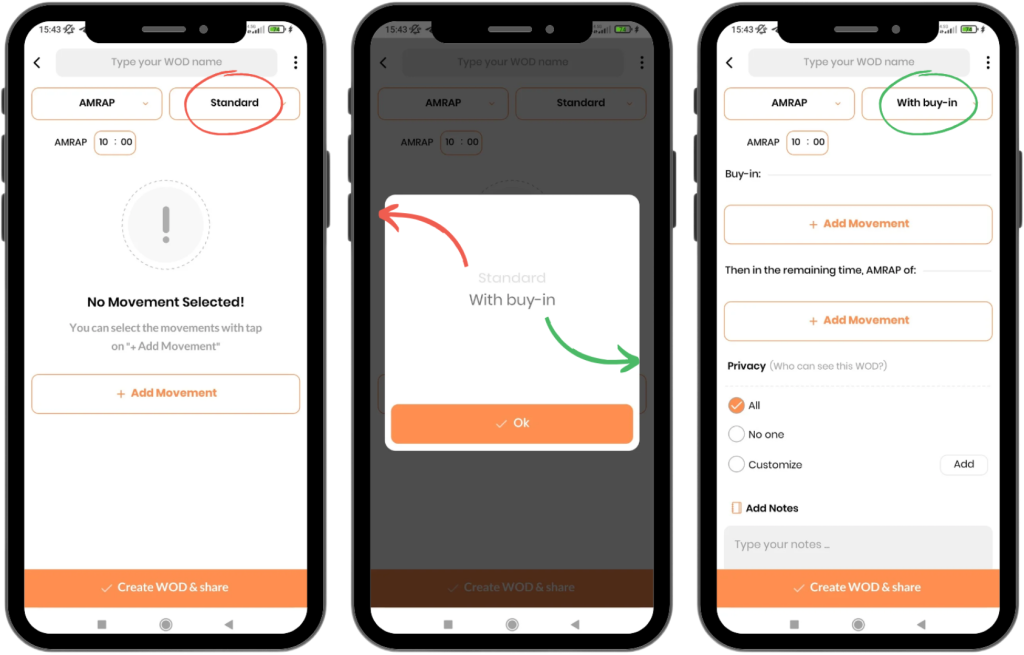
AMRAP stands for As Many Rounds/Reps As Possible, which refers to completing as many rounds or repetitions as possible within a set period of time. The goal of AMRAP workouts is to push for maximum performance in a fixed time frame, improving endurance, strength, and mental toughness for managing stress.
In the WODEX app, you can design AMRAP workout programs in two modes:
- Standard Mode
- Buy-In Mode
Standard Mode
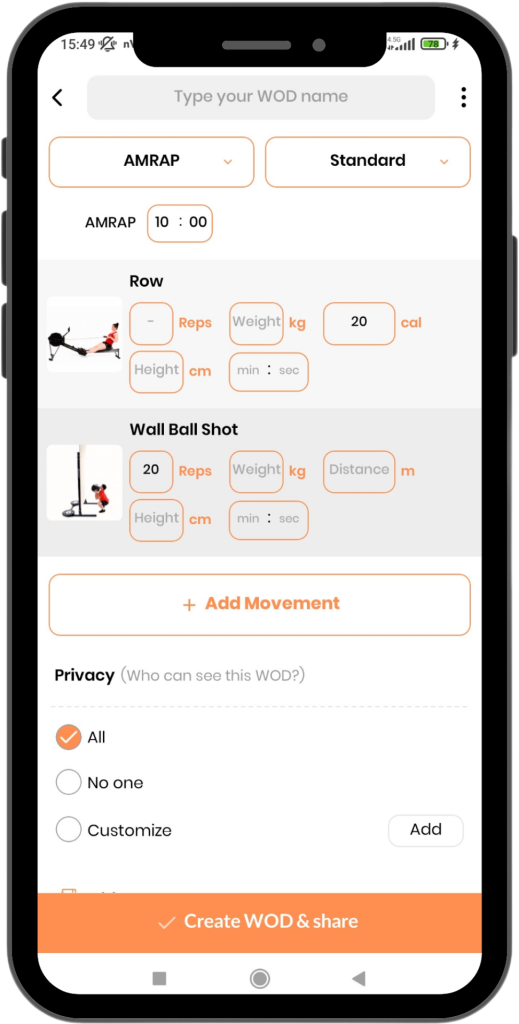
Setting the Time:
- At the top of the page, you can specify the duration of the workout. By default, the time is set to 10 minutes, but you can adjust it according to your preferences.
Example:
In the example shown in the image:
- The athlete has 10 minutes to complete as many repetitions as possible of the two exercises in the program.
- The athlete must perform the exercises in sequence, then loop back and continue the exercises until the time runs out.
Scoring:
- The athlete’s score will be the total number of reps completed within the 10-minute time frame.
Buy-in Mode
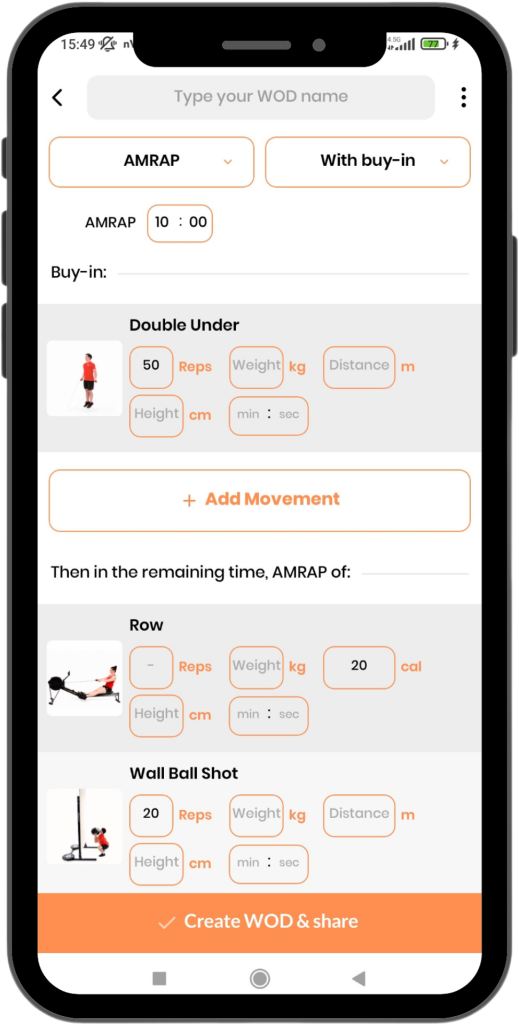
Buy-in and Remaining Time. This setup adds a unique challenge to the AMRAP workout.
How It Works:
- First, the athlete must complete the Buy-in exercise, which typically involves a specific number of reps.
- After completing the Buy-in exercise, the athlete continues with the AMRAP workout during the Remaining Time.
Setting the Time:
- The athlete will still be working within a fixed time period, but the Buy-in portion is performed before starting the AMRAP portion.
Example:
In the example shown in the image:
- The athlete must perform 50 Double-Unders as the Buy-in section.
- After completing the Buy-in, the athlete moves to the main program, performing exercises like Row and Wall Ball Shots, alternating between them.
- The athlete must repeat the cycle until the remaining time runs out.
Scoring:
- The athlete’s score in Buy-in Mode will be the total number of reps completed during the Remaining Time section
Why Choose AMRAP Workouts?
- Endurance and Intensity: AMRAP workouts help you test and improve your endurance by pushing you to complete as many reps or rounds as possible within the given time.
- Competitive Edge: You can track your performance over time, aiming to beat your previous scores and improve your strength, speed, and overall fitness.
- Flexibility: AMRAP workouts are highly customizable, allowing you to create challenges based on the time available, the type of exercises, and your specific fitness goals.
How to Design an Effective AMRAP Workout?
- Select Challenging Movements: Choose exercises that challenge both strength and endurance, such as compound movements or high-intensity cardio.
- Define the Time Limit: Decide on an appropriate time limit for the workout. Beginners may start with shorter durations, while advanced athletes may aim for longer sessions.
- Monitor Progress: Keep track of the total reps or rounds completed in each session to measure improvement and adjust the difficulty of future workouts.
In summary, AMRAP is a powerful workout format that can boost your fitness levels by improving endurance, strength, and mental toughness. Create your AMRAP workout today in the Wodex App and take your training to the next level!
By following these guidelines, you’ll be able to create a varied and challenging AMRAP workout that is perfect for achieving your fitness goals.
Create For Time Workout
Complete Guide to Creating For Time Workout Programs in WODEX App
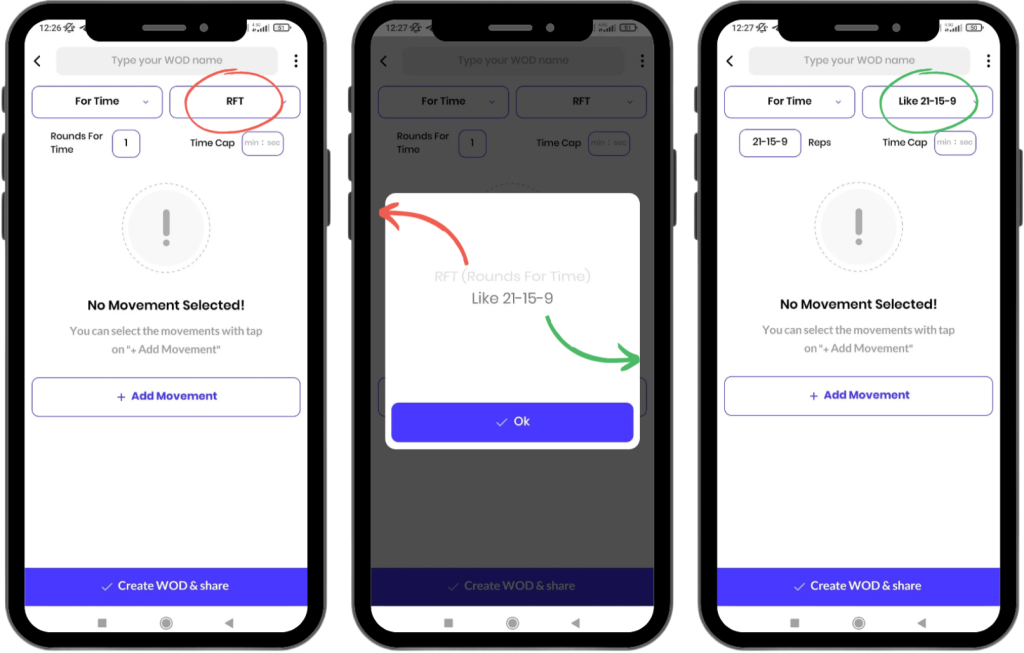
For Time workouts focus on completing exercises in the shortest possible time, aiming to improve speed, endurance, and efficiency. The quicker you complete the workout, the higher your fitness level, and the better your score. In the WODEX app, you can create For Time training programs in two methods:
A) Rounds For Time (RFT)
B) Pyramid Model (Like 21-15-9)
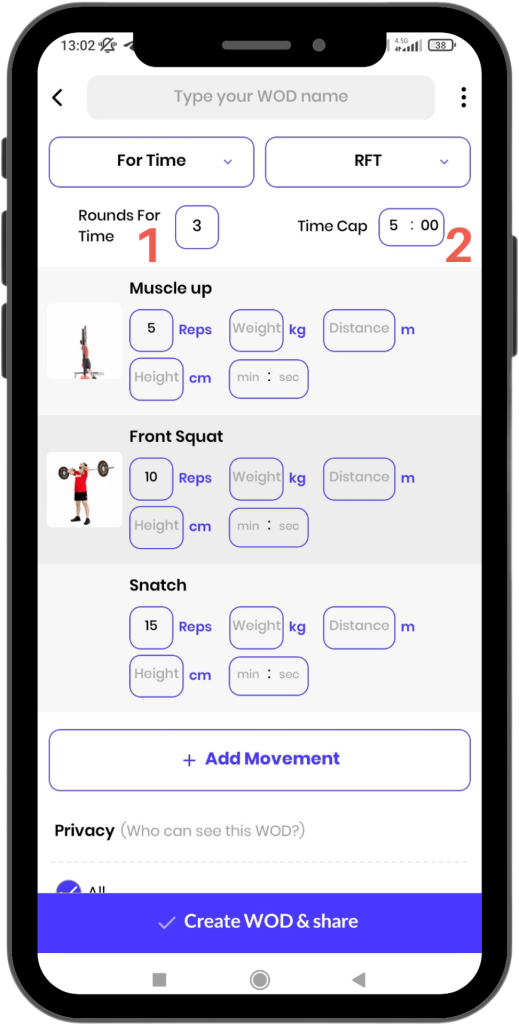
Rounds For Time (RFT)
This method sets how many rounds the athlete should complete of the designated exercises.
Key Settings in This Model:
1) Rounds for Time (RFT):
The number of rounds the athlete must complete the exercises.
2) Time Cap:
The maximum time allowed to complete the workout, adjustable in minutes and seconds.
Example:
Here’s an example based on the program specified in the image:
- The athlete needs to perform the listed exercises in a single round.
- After completing the last exercise, they must restart the sequence and repeat it for the specified number of rounds (e.g., 3 rounds).
- If the time cap is set to 12 minutes:
- If the athlete completes the workout in under 12 minutes, the recorded time is considered as their score.
- If the workout is not completed in 12 minutes, the total repetitions completed during that time will be recorded as their score.
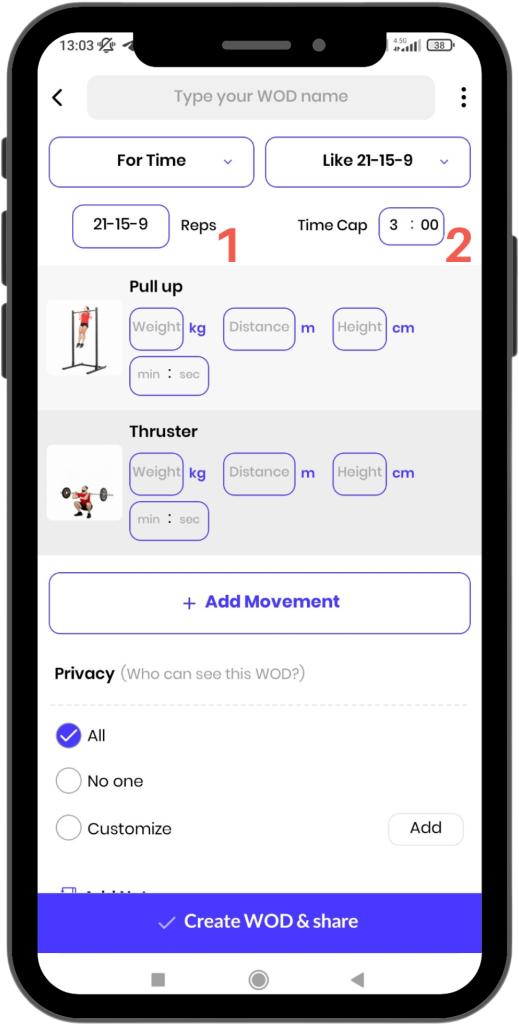
Pyramid Model (9-15-21)
This model involves variable repetitions for each round of the workout.
Key Settings in This Model:
1) Reps:
Specifies how many repetitions of each exercise should be completed in each round.
- Default: 21-15-9
- The numbers can be customized. Simply input the desired numbers, separating them with dashes.
2) Time Cap:
The maximum time allowed to complete the workout, adjustable in minutes and seconds.
Example:
Suppose the program includes two exercises:
- In the first round, the athlete performs 21 repetitions of each exercise.
- In the second round, they perform 15 repetitions of each exercise.
- In the third round, they perform 9 repetitions of each exercise.
- Time Cap: If the time cap is set to 3 minutes:
- If the athlete completes the workout in under 3 minutes, their time is recorded as their score.
- If the workout is not completed in the time cap, the total repetitions performed are recorded as their score.
Why Use For Time Workouts?
- Improved Speed and Endurance:
These workouts push you to complete exercises at a faster pace, increasing your cardiovascular and muscular endurance. - Compete Against Yourself and Others:
With the time cap and scoring system, you can clearly see your progress and compare it against others. - Flexible Program Design:
Using RFT and Pyramid settings, you can create varied programs for yourself or others, keeping the workouts interesting and challenging.
How to Create a Professional For Time Program?
- Choose the Right Movements:
Select exercises that challenge both speed and strength to ensure a comprehensive workout. - Set a Time Cap Based on Fitness Level:
Adjust the time cap according to your current fitness level for a challenging yet achievable goal. - Incorporate Variety:
Mixing movements and pyramid settings makes the program more engaging and effective.
The WODEX app is a professional tool for designing advanced workout programs. Start creating your For Time program today and push your performance to the next level! 💪
Create Fitness Workout
Complete Guide to Creating a Fitness Workout Program in the WODEX App
In the WODEX app, you can easily design personalized fitness workout plans to improve your physical condition and strengthen your muscles.
These programs, inspired by popular gym exercises, help you maintain a consistent and effective workout routine.
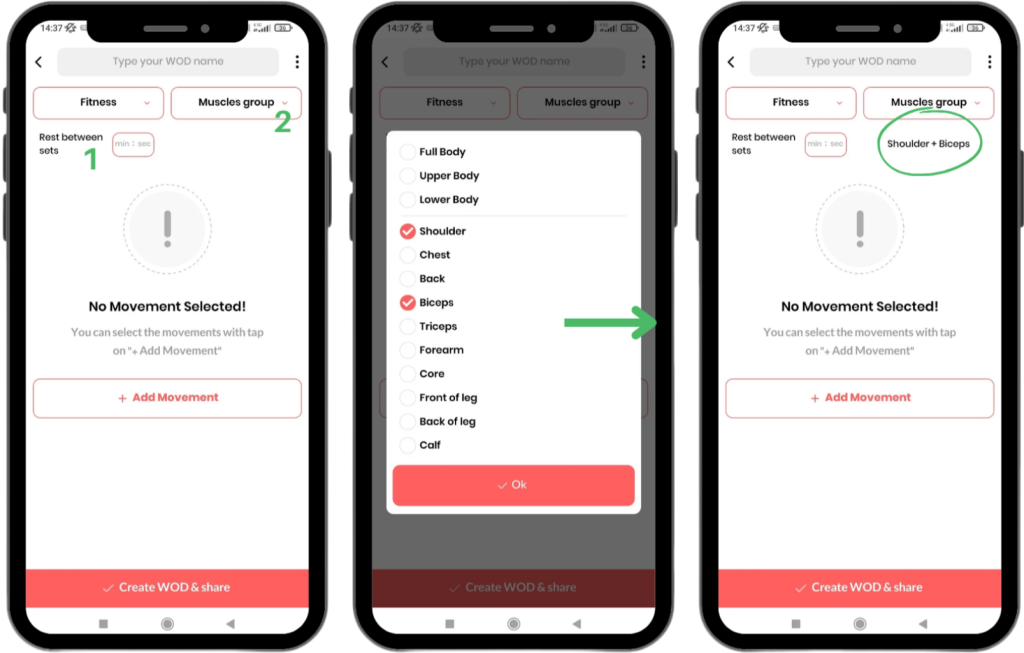
Features and Settings of the Fitness Workout Program
Rest Between Sets
- In your program, you can specify how much rest the athlete should have between each set.
- Rest time can be adjusted in minutes and second
Select Muscle Group:
- By selecting a muscle group, you can determine which muscles will be engaged during the workout.
- This feature is particularly useful for designing targeted exercises, such as focusing on legs, core, or upper body muscles.
Types of Repetition Models for Workouts
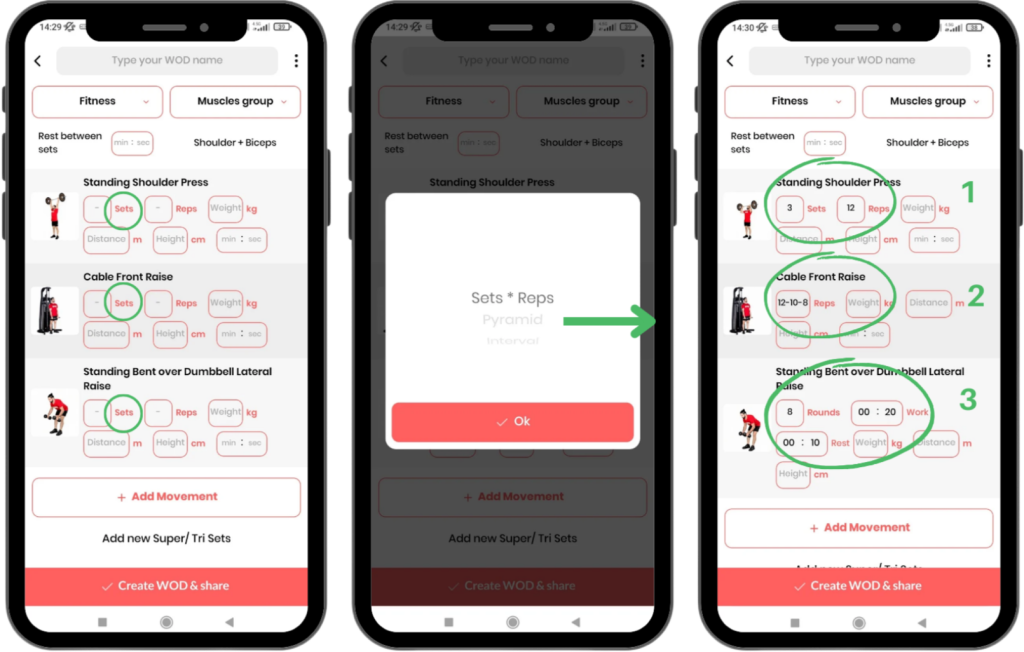
When designing each exercise, you can choose from one of the following models:
1) Sets × Reps:
- In this model, you define the number of sets and repetitions for each exercise.
- Example: 3 sets of 12 reps (The athlete must perform the exercise in 3 sets of 12 reps).
2) Pyramid:
- This model allows you to set different repetitions for each set.
- Example: Set 1 = 12 reps, Set 2 = 10 reps, Set 3 = 8 reps.
3) Interval:
- This model includes rounds (Rounds), work periods (Work), and rest periods (Rest).
- Interval training is ideal for exercises requiring alternating intensity and rest.
- Example: 3 rounds, 30 seconds work, 15 seconds rest.
Super Sets and Tri Sets
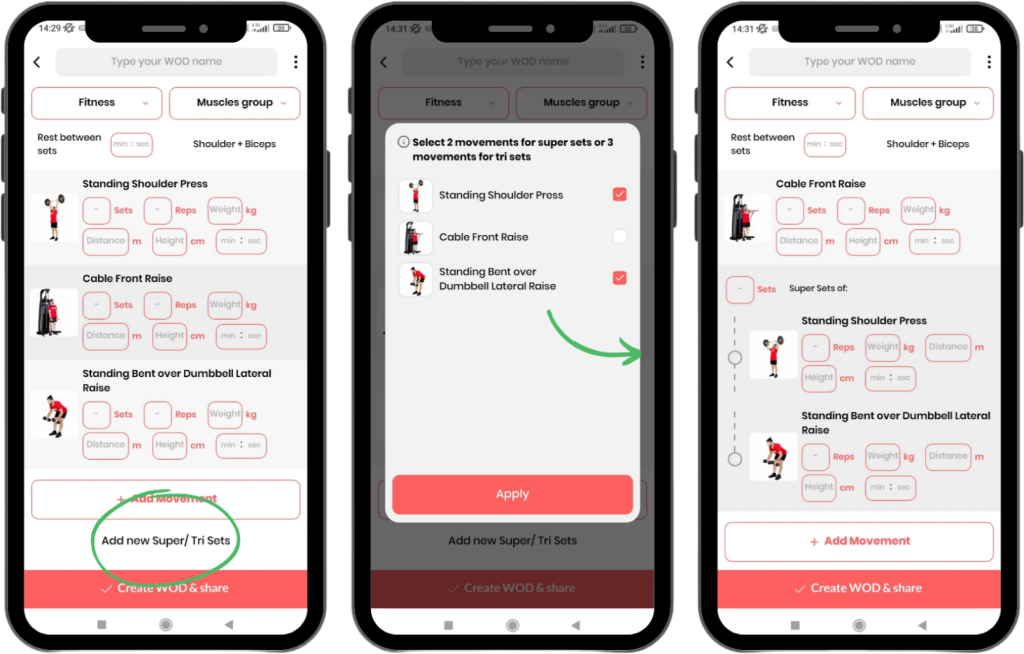
Here’s how to define super sets and tri sets:
- Click on Add New Super/Tri Sets.
- For a super set, select two exercises; for a tri set, select three exercises.
- The selected exercises are grouped together in your workout program and will be performed consecutively.
Why Fitness Training Programs?
- Improved Fitness: These workouts are designed to strengthen muscles and improve physical performance.
- Personalization: Customize programs based on your fitness level and specific goals.
- Flexibility: Choose from various workout methods like pyramid sets or interval training.
- High Variety: Combine movements in super sets and tri sets to intensify the workout.
How to Design a Professional Program?
Set Your Goal:
Determine whether you want to increase endurance, muscle strength, or cardiovascular fitness.
Choose the Targeted Muscle Groups:
Focus on your weaknesses or design comprehensive programs for full-body training.
Use Different Models:
Combine various sets to create an engaging and effective program.
The WODEX app is a complete tool for creating diverse and advanced training programs. Start designing your program today and take a big step toward achieving your fitness goals! 🌟
Movement Training Guide
How to Use the Movement Training Page
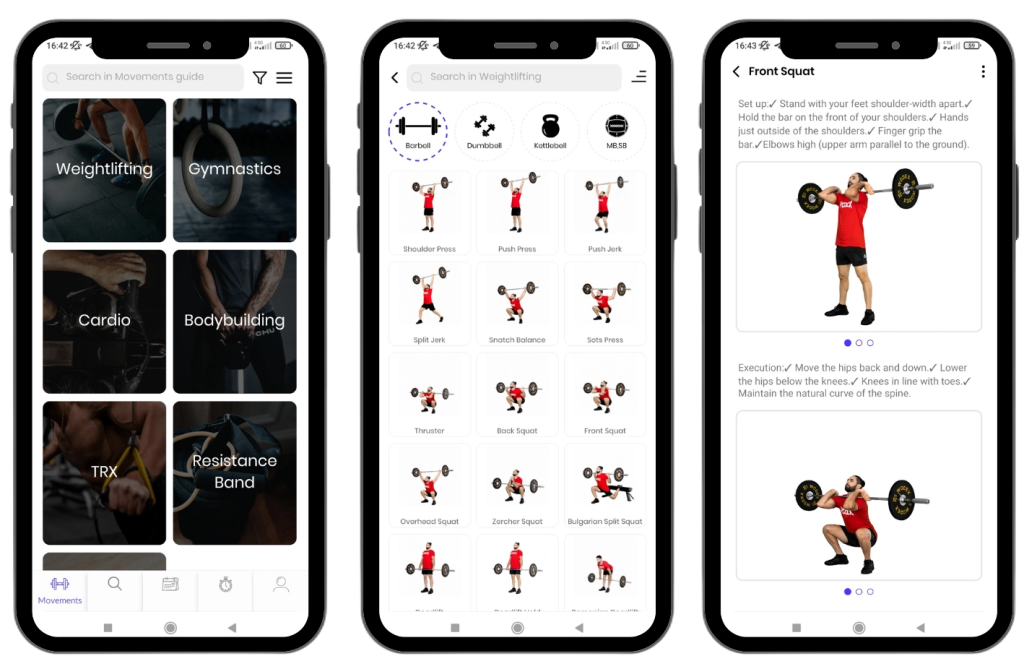
The WODEX app is a comprehensive and professional resource for learning exercise movements.
On this page, all movements are taught with images, videos, and detailed descriptions to help you learn and perform them in the best possible way.
Why Use WODEX Training?
- Visual and Video Guides: All movements are taught in full detail with images and videos.
- High Variety: A wide range of categories, suitable for all fitness levels.
- Performance Improvement: Scientific and goal-oriented exercises to achieve better results.
- Suitable for Everyone: Whether you’re a beginner or a pro, this app is the best choice for you.
Exercise Categories in the WODEX App
For your convenience, all exercise movements are divided into different categories:
1) Weightlifting
This category includes strength movements performed with various equipment:
- Barbell Movements
- Dumbbell Movements
- Kettlebell Exercises
- Medicine Ball Movements
- Sandbag Exercises
These movements are designed to enhance strength and muscular endurance.
2) Gymnastics
Gymnastics exercises focus on bodyweight and movement skills:
- Bodyweight Movements such as Plank, Squats, and Push-ups
- Exercises on the Pull-up Bar and Rings
These movements help strengthen muscles and improve flexibility.
3) Cardio
This category includes various aerobic movements designed to increase heart rate and burn calories.
These exercises cover a wide range, including:
- Running
- Jump Rope
- HIIT Workouts
4) Bodybuilding
This category focuses on strengthening exercises for specific muscles and includes the following subcategories:
- Shoulders
- Chest
- Back
- Biceps and Triceps
- Core
- Legs
It also includes exercises with equipment such as Weight Plates and Battle Ropes.
5) TRX
TRX exercises are divided into two sections:
- Upper Body Movements
- Lower Body Movements
These exercises help improve balance and strengthen muscles.
6) Resistance Band Movements
In this category, resistance band exercises are divided into two sections:
- Upper Body Exercises
- Lower Body Exercises
These exercises are ideal for strengthening muscles and increasing range of motion.
Perfect for home workouts and strengthening muscles with controlled resistance.
7) Corrective Exercises
This category is designed for individuals looking to improve posture and alleviate muscle pain:
- Pilates
- Mobility
- Stretching
- Workplace-Specific Exercises
- Massage
Easy Access to Exercise Movements
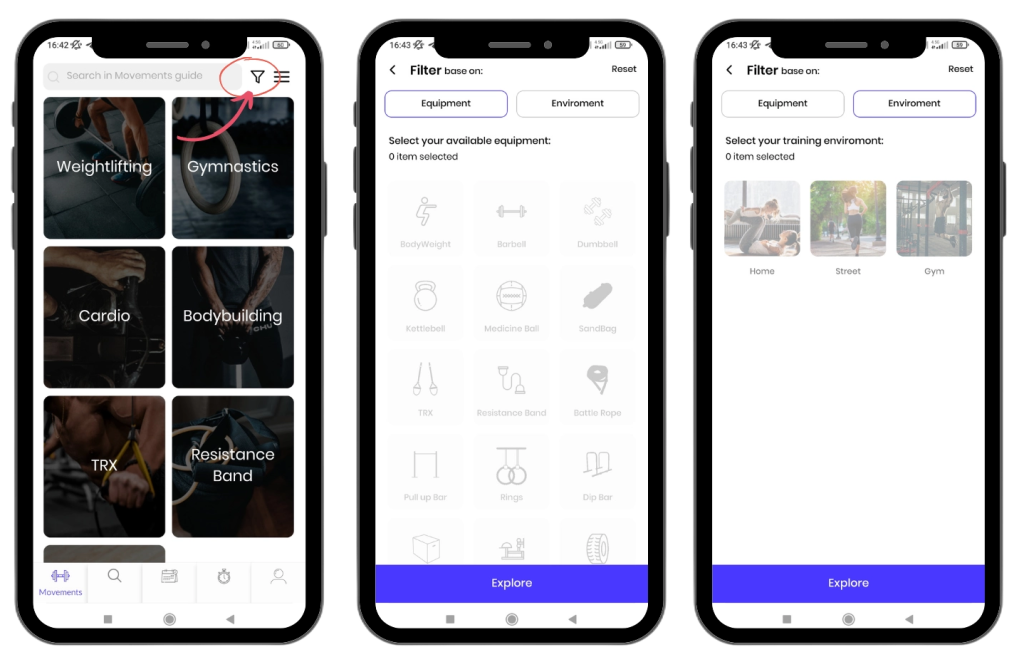
To quickly find your desired exercise movements in the WODEX app, you can use the following two methods:
1) Select the Desired Category
- Go to the Categories section.
- Choose the group that contains your desired movement.
- Once inside the category, select the specific exercise you are looking for.
2) Use the Exercise Filter
- Click on the Filter icon located at the top of the page (as shown in the image).
- Filter exercises based on:
- Equipment (e.g., dumbbell, barbell, or kettlebell)
- Training Location (e.g., gym, home, or outdoor)
- This will narrow down the results to show only relevant movements.
This feature helps you save time and quickly find exercises that match your conditions and available equipment.
WODEX is always striving to make your fitness journey easier and more practical. 🌟
How to Forward Exercises to Others in the WODEX App
You can share your desired exercise movements with other WODEX app users. Follow these steps to do so:
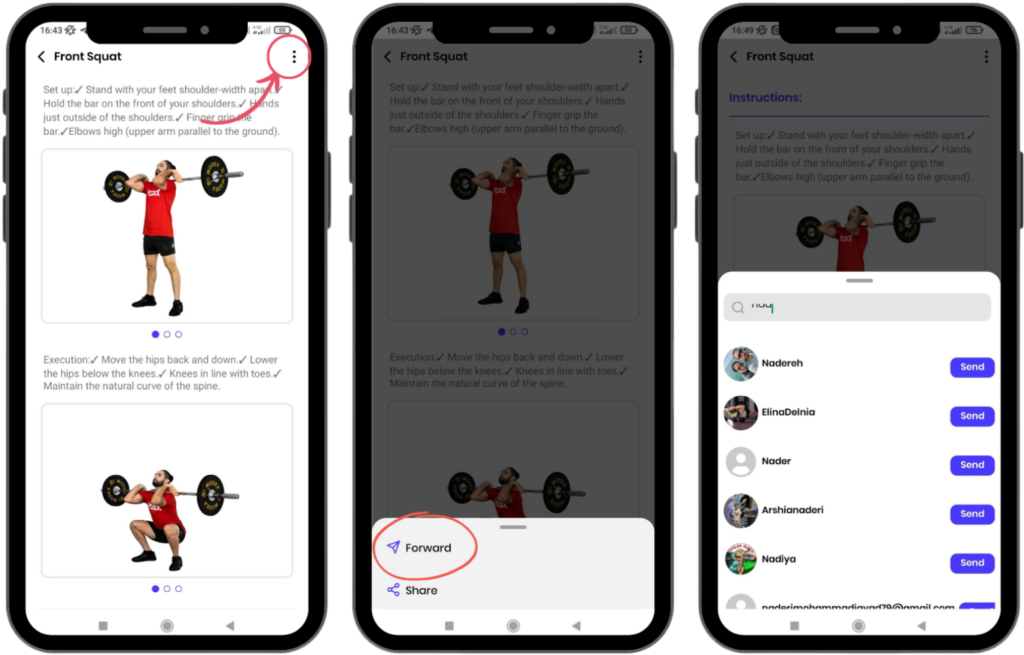
1)Click on the Three-Dots Icon
- Open the page of the exercise you want to share.
- Tap the three-dots icon at the top of the screen.
2) Select the Share Option
- From the dropdown menu, choose the Share option.
3) Send to the Desired User
- After selecting the Share option, choose the recipient you want to send the exercise to.
- The exercise will be sent directly to the selected user.
4) View the Exercise in Notifications
- The recipient can view and open the shared exercise in their Notifications section.
Note:
- This feature allows you to share useful exercises or specific movements with your friends or teammates.
- Sending exercises is a quick and easy way to share workout programs.
How to Edit Your Profile
Edit Profile
Editing Your Profile allows you to update your personal information and what is displayed to others. To edit your profile, follow these steps:
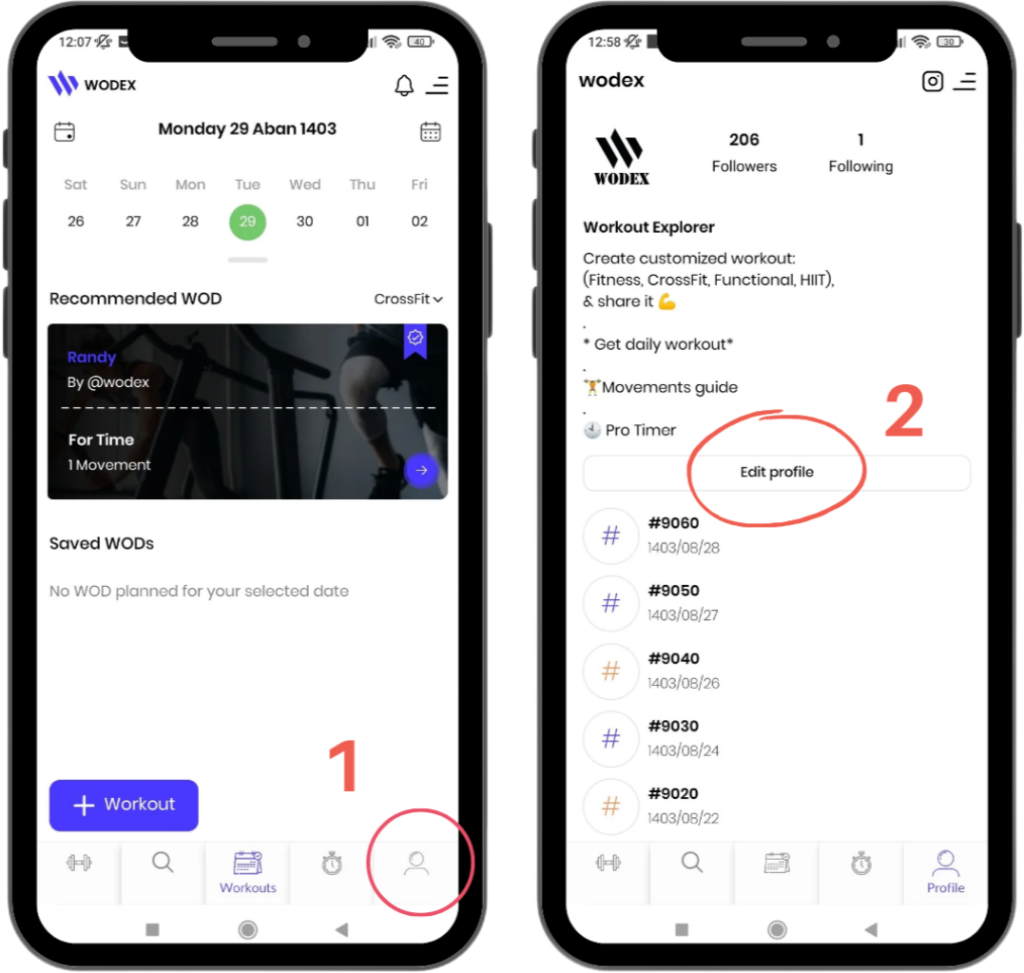
Step 1: Go to Your Profile Page
- First, navigate to your profile page.
Step 2: Select the Edit Profile Option
- On your profile page, select the Edit Profile option.
- You can now update various details as needed.
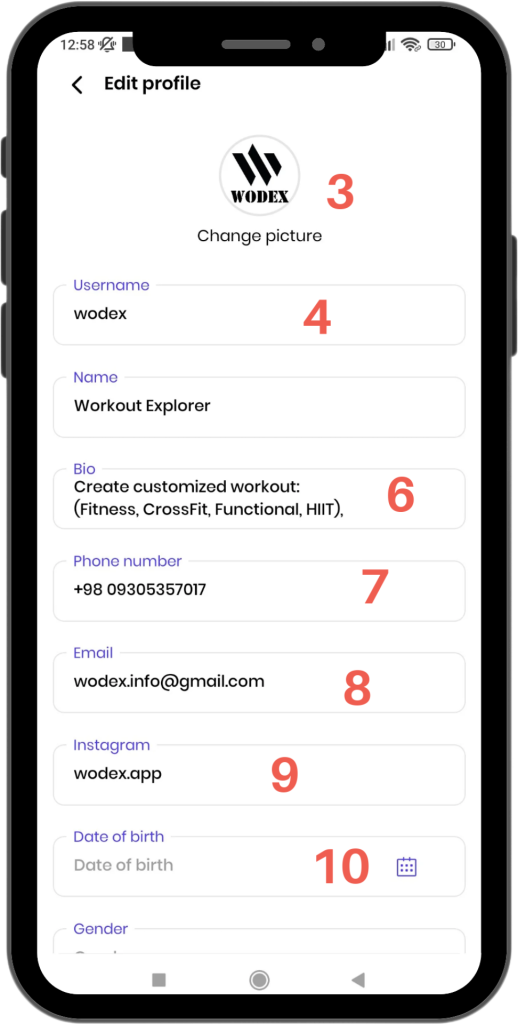
Editable Profile Information
3) Change Profile Picture
- Use this option to update or upload a new profile picture.
4) Change Username
- Easily edit your username.
- Please note, your username must be unique so others can search for you.
5) Change Name
- Enter or update your first and last name.
- This information will be visible to other users on your profile page.
6) Add Bio
- Write a brief text about yourself.
- This section can include your experiences, interests, or skills, and will be visible to other users.
7) Change Phone Number
- Update your registered phone number and make sure the new number is entered correctly.
8) Change Email
- Edit your email address to ensure updates related to your account are sent to the correct address.
9) Add Instagram Link
- Add your Instagram profile link so others can find you on social media.
10) Add Date of Birth
- Enter your date of birth to add this information to your profile.
Note:
The information entered in your profile should be accurate and valid. This helps other users get to know you better.
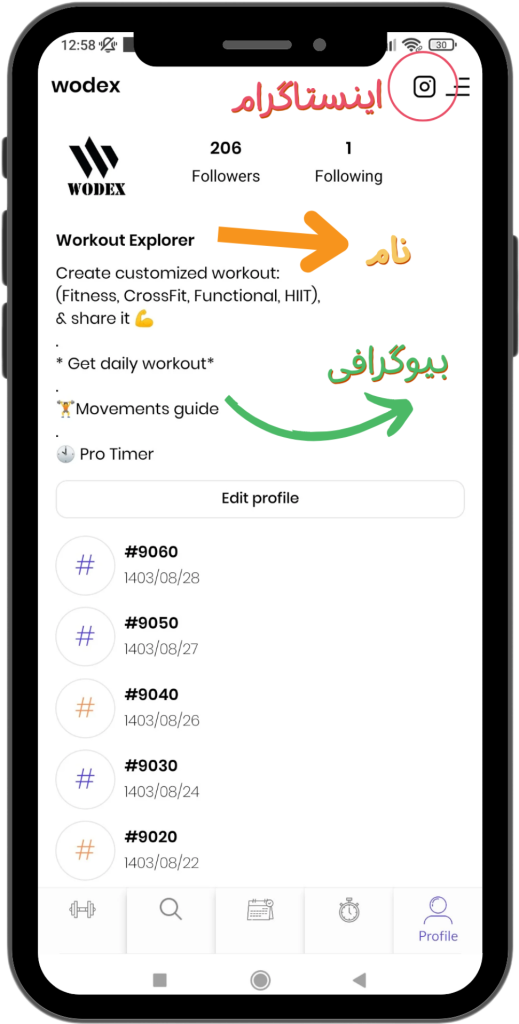
How to Change the Calendar
Switching Calendar Types in the App
To Change the Calendar Type and Select the Persian Calendar, Follow These Steps:

Step 1: Open the Menu
- Click on the menu icon located at the top of the screen.
Step 2: Access Settings
- From the opened window, select the Settings option.
Step 3: Select the Calendar Option
- In the Settings page, click on the Calendar option.
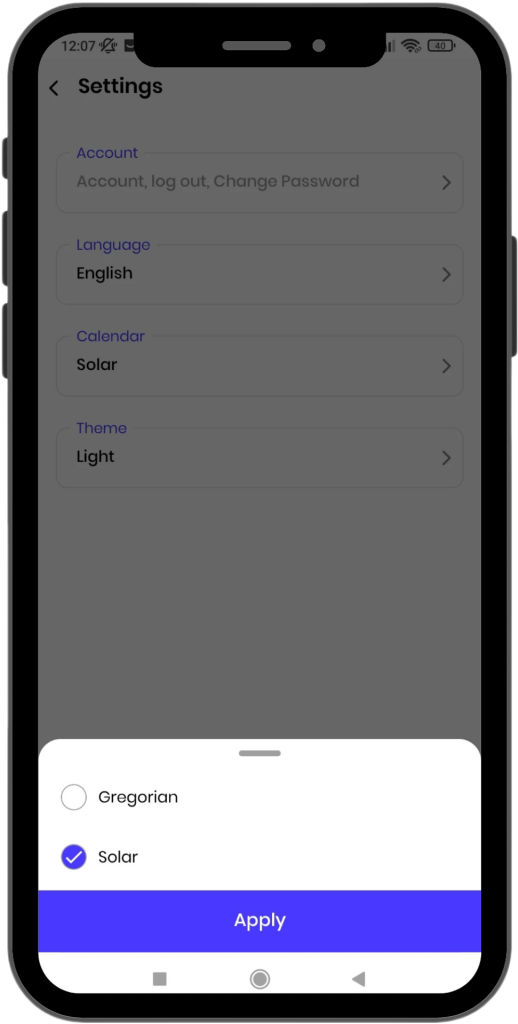
Step 4: Select Calendar Type
- In this section, choose your preferred calendar type.
- To select the Persian Calendar, choose the Solar option.
If you have any questions or encounter any issues, our support team is ready to assist you:
How to Submit a Video and Record a Score
How to Check Game Information
How to register for the games
Home Workout: Monday, December 16, 2024
How to Change the Language
Switching the Language in the App
To Change the Language in the App, Follow These Steps:
Step 1: Open the Menu
- Click on the menu icon located at the top of the screen.
Step 2: Access Settings
- From the opened window, select the Settings option.
Step 3: Select the Language Option
- In the Settings page, click on the Language option.
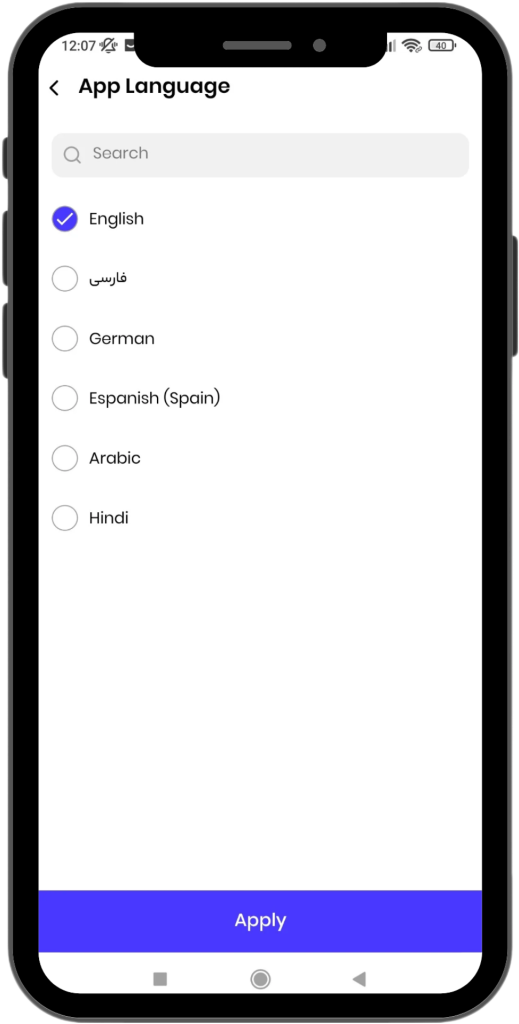
Step 4: Select Your Preferred Language
- Choose your preferred language from the available options.
Active Languages in the WODEX App
The WODEX app currently supports the following languages:
- English
- Persian
- German
- Spanish
- Arabic
- Hindi
By following these steps, the app language will be changed to your selected language.
If you have any questions or encounter any issues, our support team is ready to assist you: