
CrossFit Workout: Sunday, March 02, 2025
CrossFit Workout: Sunday, March 02, 2025
This high-skill AMRAP tests overhead mobility, pulling strength, and explosive power, demanding efficiency in movement execution.
Movement Analysis:
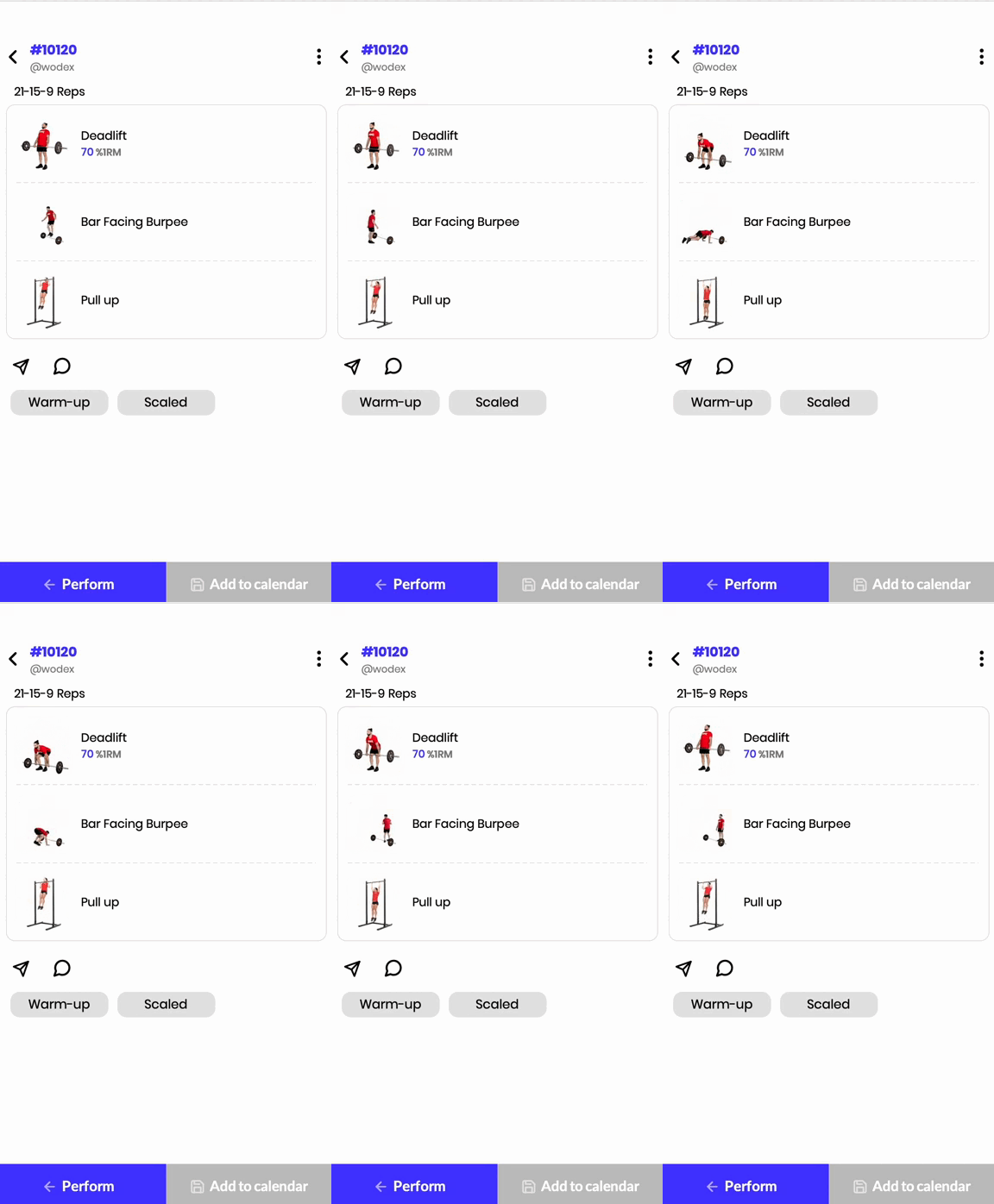
✅ Deadlifts: Develop posterior chain strength and pulling power.
✅ Bar-facing Burpees: Improve agility, coordination, and cardiovascular endurance.
✅ Pull-ups: Enhance upper-body pulling strength and grip endurance.
Energy System:
🔋 A blend of phosphagen (deadlifts) and glycolytic (burpees and pull-ups), requiring both power and endurance.
Workout Goals:
🎯 Maintain a fast but controlled pace.
🎯 Optimize barbell efficiency for unbroken or minimal-rest deadlifts.
🎯 Use an efficient kip or butterfly technique in pull-ups.
Training Tips:
✔ Keep a strong core and neutral spine during deadlifts.
✔ Pace burpees to prevent burnout before pull-ups.
✔ Control breathing for steady output.
This WOD is a great test of strength, endurance, and movement efficiency under fatigue.
Workout Modifications for Beginner Athletes
🔹 The scaled version ensures accessibility while maintaining the original workout stimulus.
21-15-9:
- Deadlifts (55% of 1RM)
- Step-over Burpees
- Jumping Pull-ups
To access the warm-up and cool-down programs for this WOD, please use the WODEX app.
Home Workout: Wednesday, February 26, 2025
Home Workout: Wednesday, February 26, 2025
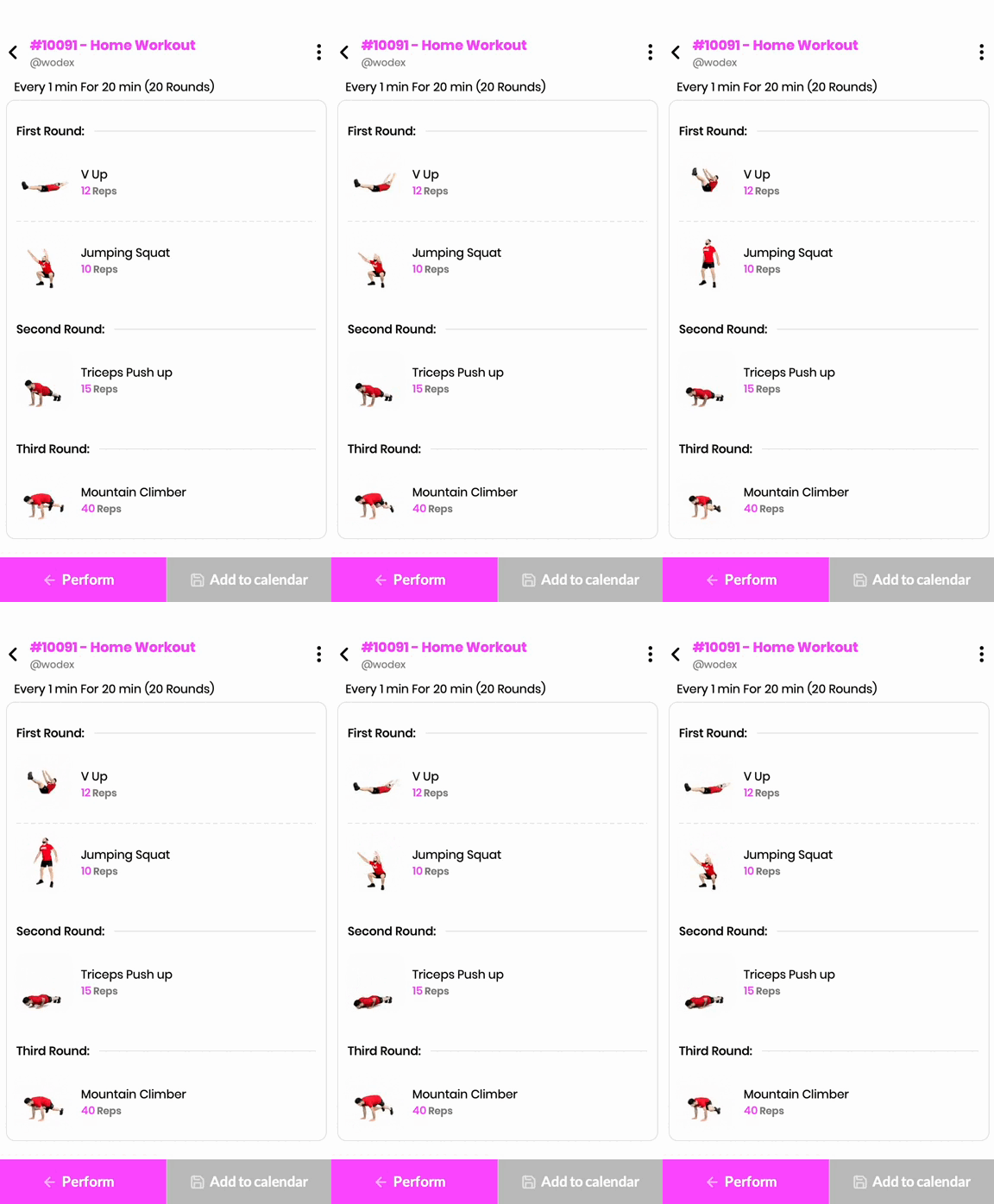
This EMOM-style workout maintains a consistent work rate, balancing lower-body power, core engagement, and upper-body strength with short rest periods.
Movement Analysis:
✅ Jump Squats: Develop explosive power and lower-body endurance.
✅ V-ups: Strengthen the core and improve midline control.
✅ Push-ups: Enhance pushing strength and fast-twitch muscle activation.
✅ Mountain Climbers: Increase cardiovascular endurance and core stability.
Energy System:
🔋 The glycolytic and phosphagen systems drive performance, requiring both strength endurance and speed.
Workout Goals:
🎯 Improve explosive strength and muscular endurance.
🎯 Develop core control under fatigue.
🎯 Maintain a steady work pace with minimal drop-off in performance.
Training Tips:
✔ Keep movement quality high despite fatigue.
✔ Control breathing to maintain a consistent rhythm.
✔ Engage the core during each movement to prevent unnecessary strain.
CrossFit Workout: Wednesday, February 26, 2025
CrossFit Workout: Wednesday, February 26, 2025
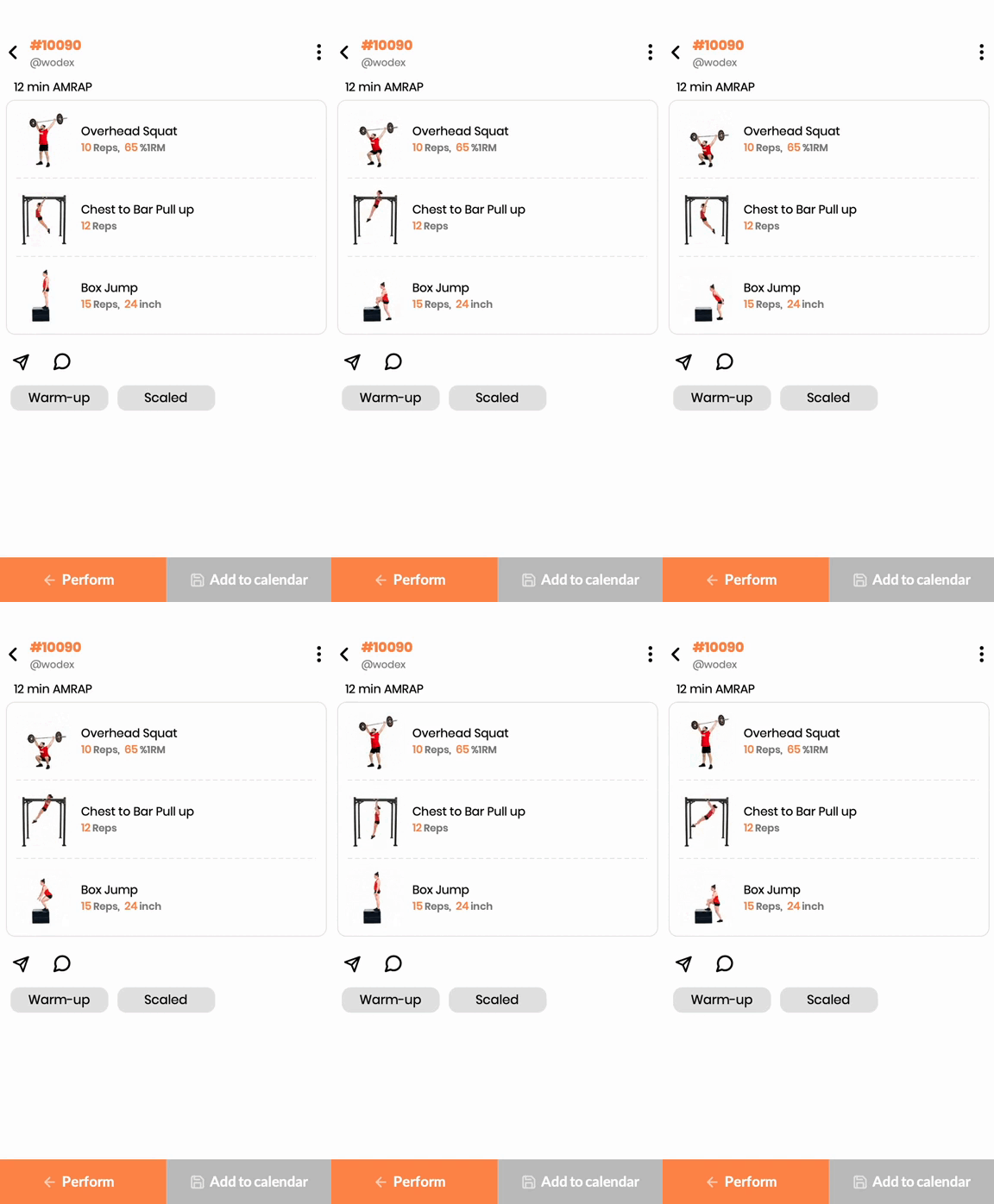
This high-skill AMRAP tests overhead mobility, pulling strength, and explosive power, demanding efficiency in movement execution.
Movement Analysis:
✅ Overhead Squats: Improve mobility, balance, and full-body strength.
✅ Chest-to-Bar Pull-ups: Develop pulling power and grip endurance.
✅ Box Jumps: Enhance explosive lower-body power and coordination.
Energy System:
🔋 The glycolytic and phosphagen systems drive performance, requiring both strength endurance and speed.
Workout Goals:
🎯 Maintain consistency across rounds without excessive drop-off.
🎯 Improve barbell and gymnastics efficiency under fatigue.
🎯 Enhance cardiovascular capacity and muscular endurance.
Training Tips:
✔ Maintain a strong core in overhead squats for stability.
✔ Use a controlled kip for efficient chest-to-bar pull-ups.
✔ Land softly in box jumps to reduce joint impact.
Workout Modifications for Beginner Athletes
The scaled version modifies complexity and load while keeping the intended training effect intact.
This WOD is a great blend of strength, mobility, and conditioning under time pressure.
To access the warm-up and cool-down programs for this WOD, please use the WODEX app.
Home Workout: Tuesday, February 25, 2025
Home Workout: Tuesday, February 25, 2025
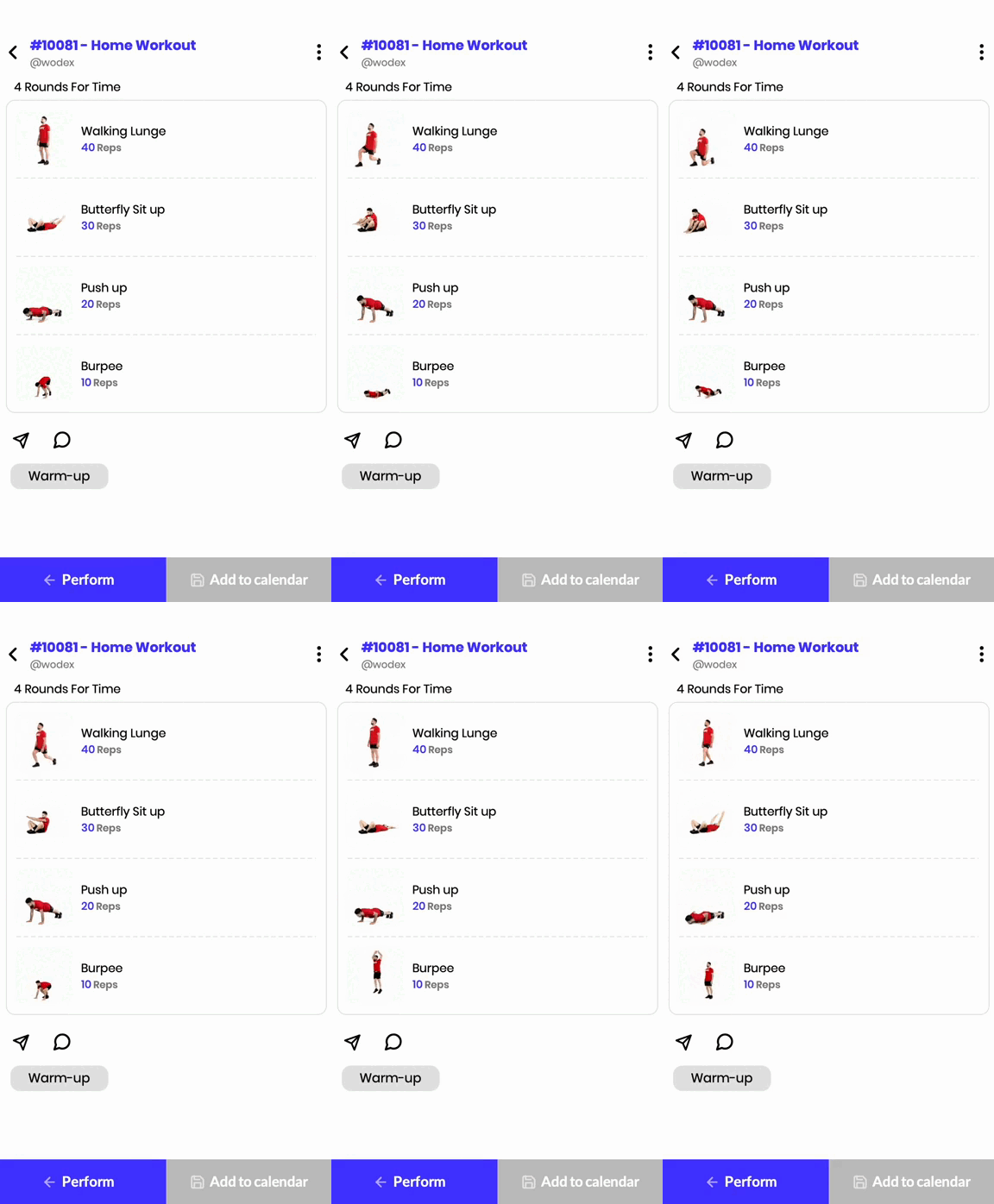
This bodyweight endurance workout focuses on lower-body strength, core endurance, and upper-body pushing power while maintaining a steady cardiovascular output.
Movement Analysis:
✅ Walking Lunges: Strengthen the quadriceps, hamstrings, and glutes while improving balance and coordination.
✅ Sit-ups: Enhance core strength and midline stability.
✅ Push-ups: Develop upper-body pushing power, engaging the chest, shoulders, and triceps.
✅ Burpees: Improve explosive power and cardiovascular endurance.
Energy System:
🔋 The glycolytic system dominates, with contributions from the oxidative system due to sustained effort over multiple rounds.
Workout Goals:
🎯 Improve muscular endurance and full-body conditioning.
🎯 Develop core strength and midline stability.
🎯 Enhance overall work capacity and movement efficiency.
Training Tips:
✔ Keep a steady pace to prevent early burnout.
✔ Focus on proper lunge depth to maximize muscle activation.
✔ Engage the core throughout sit-ups to prevent lower back strain.
CrossFit Workout: Tuesday, February 25, 2025
CrossFit Workout: Tuesday, February 25, 2025
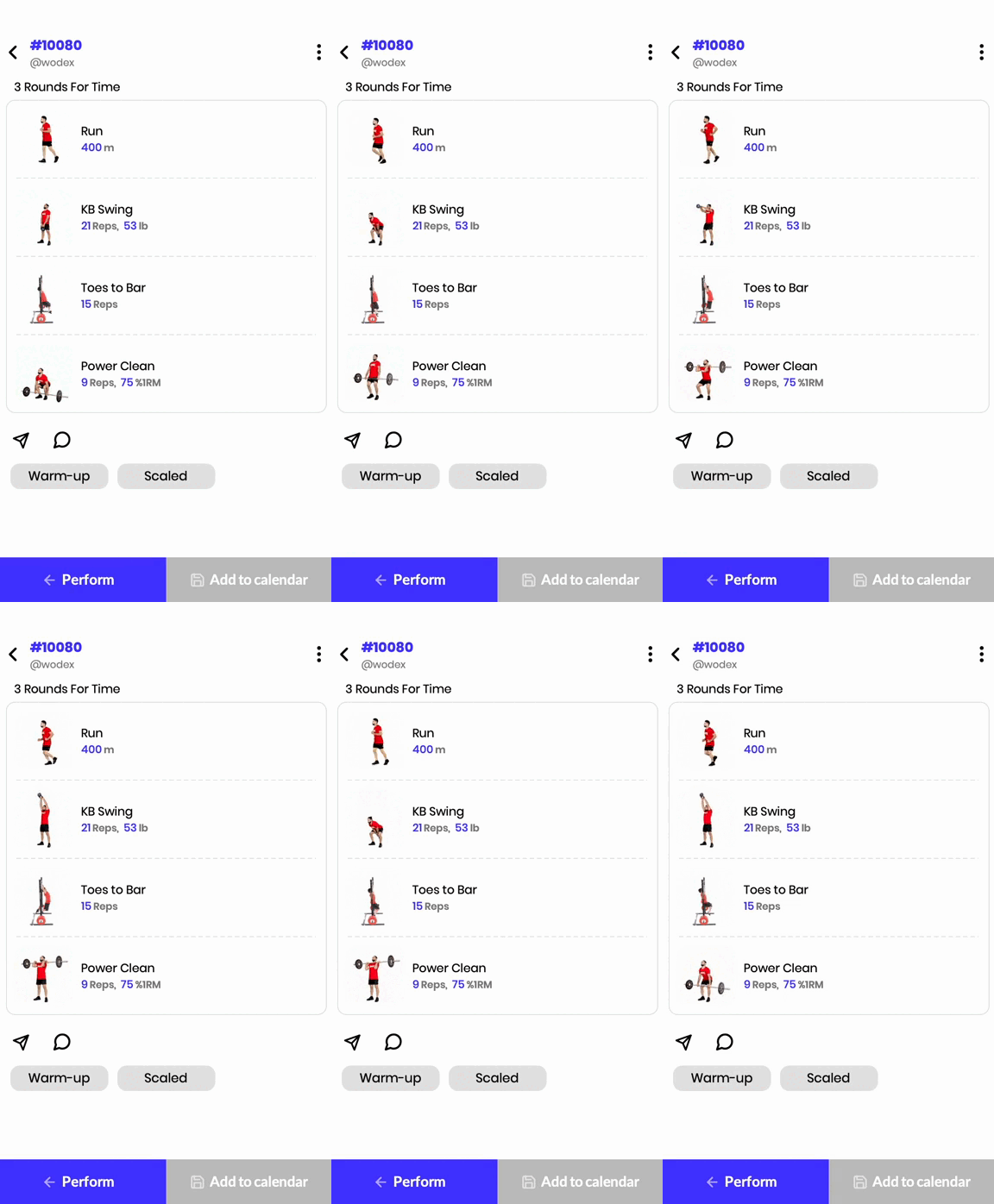
This triplet workout balances running, weightlifting, and gymnastics, challenging both metabolic conditioning and muscular endurance.
Movement Analysis:
✅ 400m Run: Enhances cardiovascular endurance and aerobic capacity.
✅ Kettlebell Swings: Develop explosive hip drive and posterior chain strength.
✅ Toes-to-Bar: Improve midline stability, grip strength, and core endurance.
✅ Power Cleans: Build pulling power and speed under the bar.
Energy System:
🔋 A mix of oxidative and glycolytic systems, requiring endurance and strength endurance.
Workout Goals:
🎯 Improve pacing and breathing control.
🎯 Develop grip endurance for kettlebell swings and toes-to-bar.
🎯 Enhance barbell cycling efficiency in power cleans.
Training Tips:
✔ Control breathing during the run to maintain a steady heart rate.
✔ Use a strong hip drive in kettlebell swings to reduce arm fatigue.
✔ Maintain a tight core and kip efficiently in toes-to-bar.
✔ Break power cleans into manageable sets to sustain intensity.
This WOD is an effective test of endurance, power output, and movement efficiency under fatigue.
Workout Modifications for Beginner Athletes
🔹 The scaled version adjusts weight and movement complexity while preserving the stimulus, making it accessible to all levels.
3 Rounds:
- 400m Run or 30 Cal Row
- 21 Russian Kettlebell Swings (35/25 lbs)
- 15 Hanging Knee Raises
- 9 Hang Power Cleans (55% of 1RM)
To access the warm-up and cool-down programs for this WOD, please use the WODEX app.
Home Workout: Monday, February 24, 2025
Home Workout: Monday, February 24, 2025
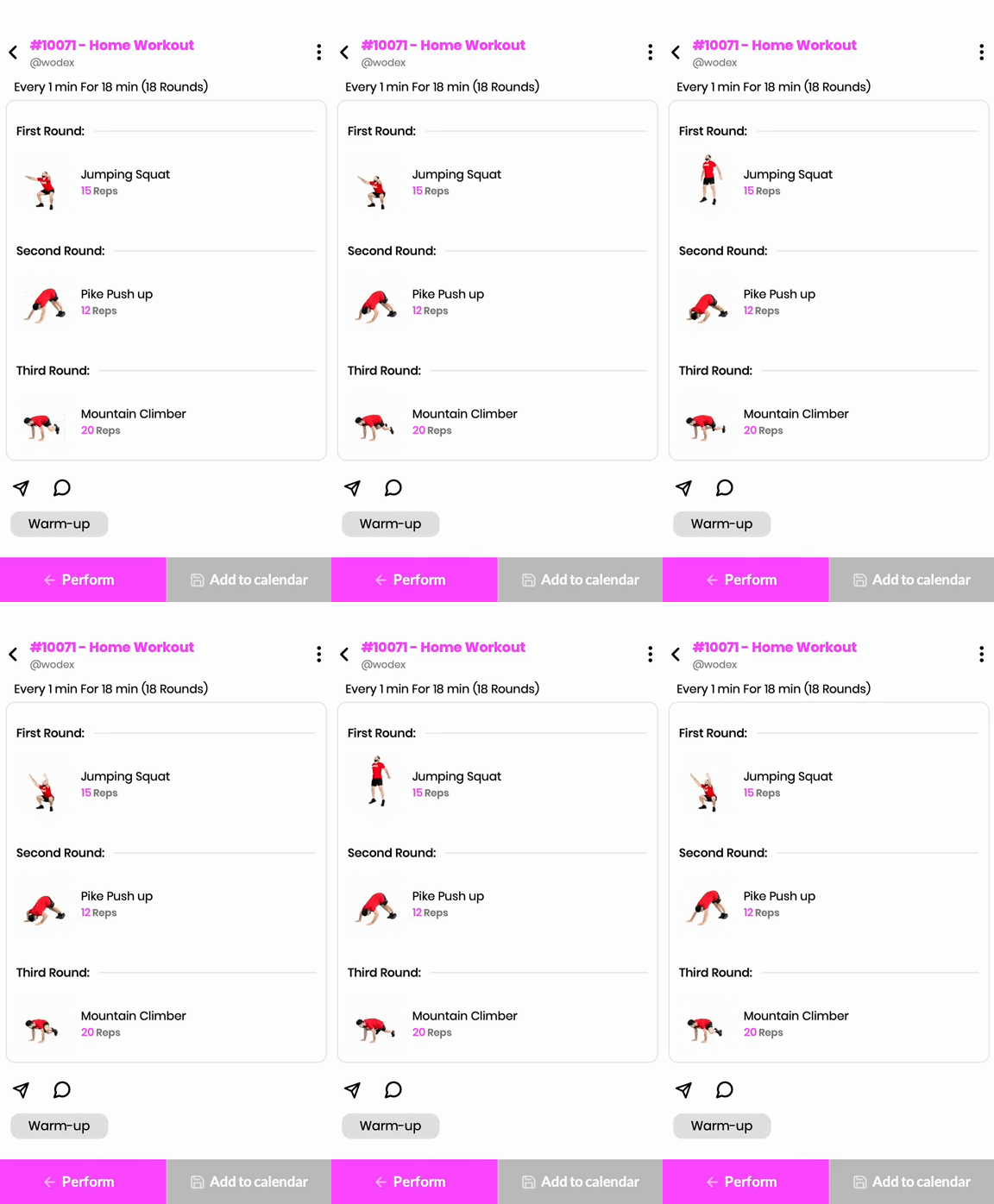
This EMOM structure focuses on movement efficiency, muscular endurance, and aerobic capacity. The short but intense bursts of work followed by rest periods allow for sustained effort while minimizing fatigue.
Movement Analysis:
✅ Jump Squats: Enhance lower-body explosive strength, particularly in the quadriceps and glutes.
✅ Pike Push-ups: Strengthen the shoulders and triceps, mimicking overhead pressing movements.
✅ Mountain Climbers: Develop core endurance and improve coordination while elevating heart rate.
Energy System:
🔋 The phosphagen system is activated in the early reps, while the glycolytic system takes over as intensity builds.
Workout Goals:
🎯 Develop explosive power and endurance in the lower body.
🎯 Strengthen shoulder stability and pressing strength.
🎯 Improve coordination and cardiovascular efficiency.
Training Tips:
✔ Maintain a controlled landing during jump squats to protect the knees.
✔ Engage the core in pike push-ups to prevent lower back strain.
✔ Keep a steady pace in mountain climbers to sustain intensity.
CrossFit Workout: Monday, February 24, 2025
CrossFit Workout: Monday, February 24, 2025
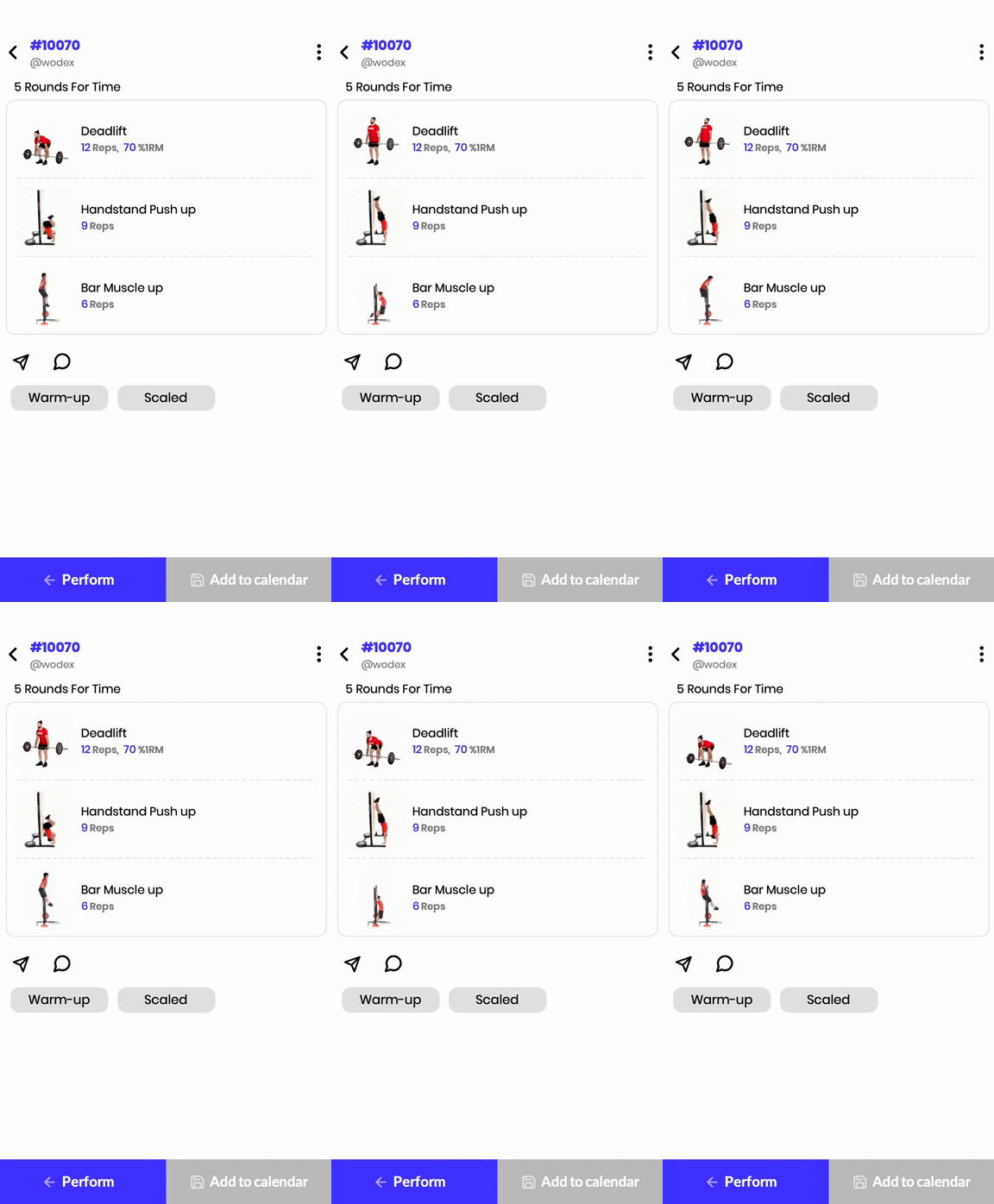
This triplet workout challenges strength, skill, and endurance with a well-balanced combination of weightlifting, gymnastics, and pressing movements. The moderate rep count per round allows for intensity while maintaining movement quality.
Movement Analysis:
✅ Deadlifts: Engage the posterior chain, including the hamstrings, glutes, and lower back, emphasizing hip extension.
✅ Handstand Push-ups: Develop pressing strength, shoulder stability, and body control.
✅ Bar Muscle-ups: Require pulling power, grip strength, and upper-body coordination.
Energy System:
🔋 The phosphagen system plays a key role in explosive movements, while the glycolytic system supports sustained effort.
Workout Goals:
🎯 Improve pulling and pressing strength.
🎯 Enhance gymnastic efficiency and body awareness.
🎯 Develop metabolic conditioning under moderate to heavy loads.
Training Tips:
✔ Break deadlifts into sets to prevent excessive fatigue.
✔ Maintain a controlled descent in handstand push-ups to preserve shoulder endurance.
✔ Use efficient kip mechanics in bar muscle-ups to conserve energy.
This workout is an excellent test of both strength and skill, making it a valuable session for developing well-rounded athletic performance.
Workout Modifications for Beginner Athletes
The scaled version ensures accessibility by adjusting loading and modifying gymnastic movements, allowing athletes to maintain high-intensity output while progressing their skills.
5 Rounds:
- 12 Deadlifts (50% of 1RM)
- 9 Seated Dumbbell Shoulder Press (40% of 1RM Strict Press)
- 6 Jumping Chest-to-Bar Pull-ups
To access the warm-up and cool-down programs for this WOD, please use the WODEX app.
Home Workout: Saturday, February 22, 2025
Home Workout: Saturday, February 22, 2025
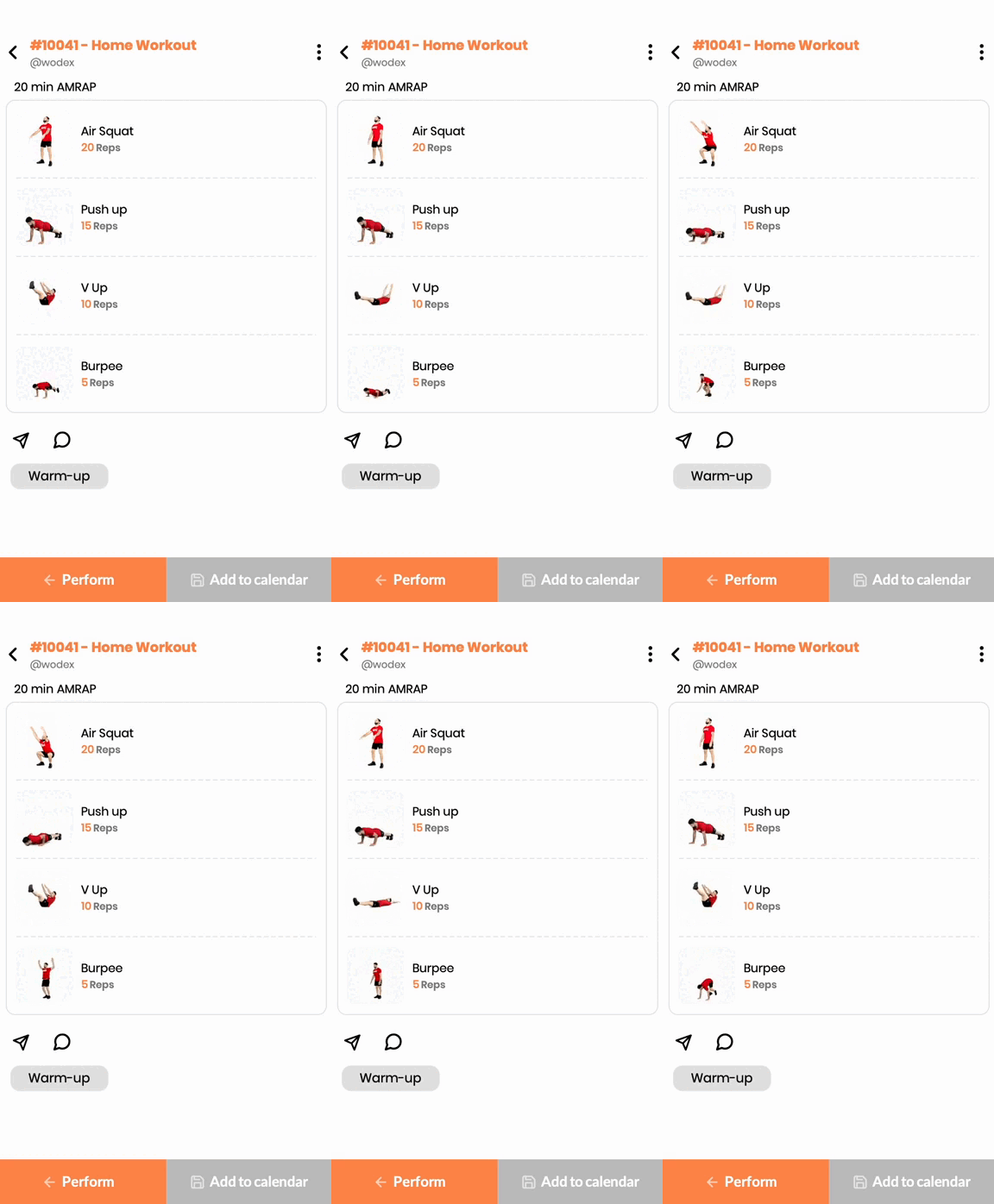
This bodyweight AMRAP workout enhances muscular endurance, cardiovascular fitness, and overall body control.
Movement Analysis:
✅ Air Squats: Strengthen the lower body, particularly the quadriceps, hamstrings, and glutes, while improving mobility.
✅ Push-ups: Develop pressing strength in the chest, shoulders, and triceps while activating the core.
✅ V-ups: Build core stability and coordination, engaging both the rectus abdominis and hip flexors.
✅ Burpees: A full-body exercise that improves explosive power and endurance.
Energy System:
🔋 The workout primarily utilizes the glycolytic and oxidative energy systems, as it requires sustained effort with short transitions between exercises.
Workout Goals:
🎯 Improve bodyweight strength and muscular endurance
🎯 Enhance aerobic and anaerobic conditioning
🎯 Develop movement efficiency and coordination
Training Tips:
✔ Maintain a steady breathing pattern throughout.
✔ Control the eccentric phase in squats and push-ups to maximize muscle activation.
✔ Avoid early burnout by pacing the first few rounds.
CrossFit Workout: Saturday, February 22, 2025
CrossFit Workout: Saturday, February 22, 2025
This high-intensity couplet tests power output, muscular endurance, and gymnastics capacity. The 21-15-9 rep scheme is designed to push athletes through decreasing volume while maintaining intensity.
Movement Analysis:
✅ Thrusters: A full-body compound movement that combines a front squat and overhead press, requiring leg drive, core stability, and upper-body strength.
✅ Pull-ups: Engage the latissimus dorsi, biceps, and shoulders while improving grip strength and overall pulling power.
Energy System:
🔋 The phosphagen system is dominant in the early reps, transitioning into the glycolytic system as the workout progresses.
Workout Goals:
🎯 Improve barbell cycling efficiency and breathing control under load.
🎯 Build upper-body pulling strength and endurance.
🎯 Develop mental resilience under fatigue.
Training Tips:
✔ Break thrusters into strategic sets (e.g., 12-9, 8-7, 9 unbroken).
✔ Use controlled breathing to sustain effort.
✔ Optimize hip drive in thrusters to minimize shoulder fatigue.
✔ Scale appropriately to maintain intensity and form.
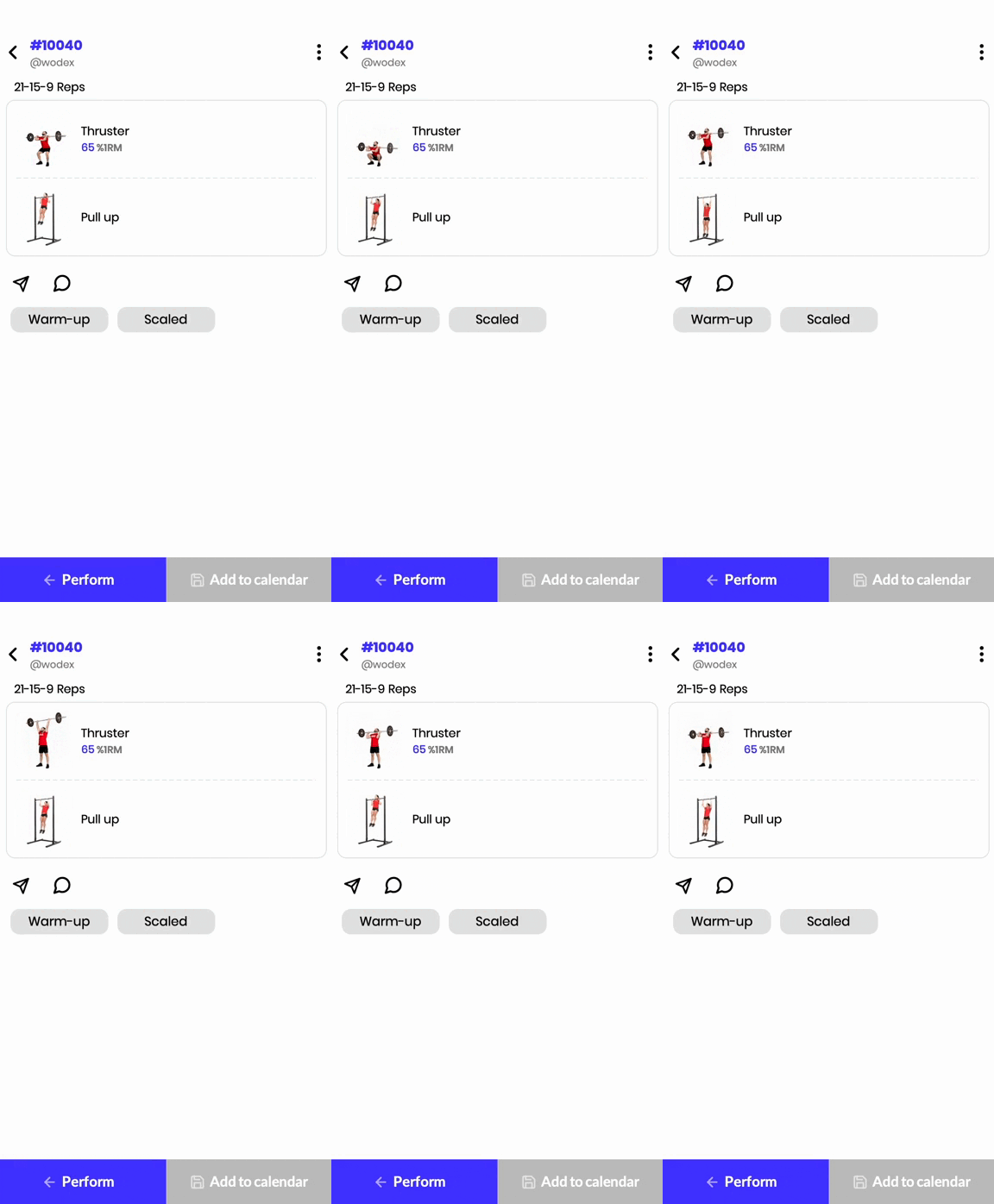
Workout Modifications for Beginner Athletes
The scaled version ensures accessibility by adjusting weights and modifying pull-ups, allowing all levels of athletes to maintain a high-intensity effort.
This WOD is a benchmark test that combines weightlifting and gymnastics, making it a valuable tool for assessing an athlete’s overall fitness and progression.
21-15-9
- Dumbbell Thrusters (Two DBs at 35-40% of 1RM Front Squat)
- Jumping Pull-ups
To access the warm-up and cool-down programs for this WOD, please use the WODEX app.
How to create games
How to create a game
Creating a Competition on WODEX: A Platform for All
The WODEX app is a unique platform for designing, managing, and participating in sports competitions. With this feature, every user can easily create their own competitions, share them with others, and host diverse sporting events. This section of the app is designed to provide a simple yet professional experience for both organizers and participants.
Key Features of WODEX Competition Section
1) Custom Competition Creation
Users can design competitions according to their needs. This includes setting the type of competition (individual or team), scheduling, participation conditions, and specific rules for each event.
2) Coverage of Online and In-person Competitions
WODEX allows the hosting of both online and in-person competitions. In online competitions, participants submit videos of their performance, and judges assess them digitally.
3) Advanced Judging Management
Organizers can assign judges to their competitions and manage the judging process through the app. Scoring, recording results, and announcing winners are carried out precisely and transparently.
4) Participant Registration and Management
Participants can easily register for competitions via the app (Registration Guide). They can view schedules, competition rules, and track their registration status.
5) Live Display and Online Leaderboards
WODEX adds excitement to competitions by offering live leaderboards with real-time score updates.
6) Monetization Tools for Organizers
Organizers can set participation fees and earn income through the app.
7) Support for Various Sports
The platform is designed for all types of sports, with flexibility to adjust the rules and criteria for each sport.
Why WODEX Competitions?
- Simple and smooth user experience
- Professional features for organizers and participants
- Centralized management of all aspects of the competition, from registration to result announcements
- Direct communication and interaction between users and judges
Steps to Create a Competition:
A) Download the App and Create an Account
B) How to Access the Games Panel
Download the App and Create an Account
The WODEX app is completely free and available to all users. By installing this app, you can easily take advantage of our various features and services. After downloading and installing the app, you will need to create an account for yourself (see How to Create an account).


How to Access the Games panel
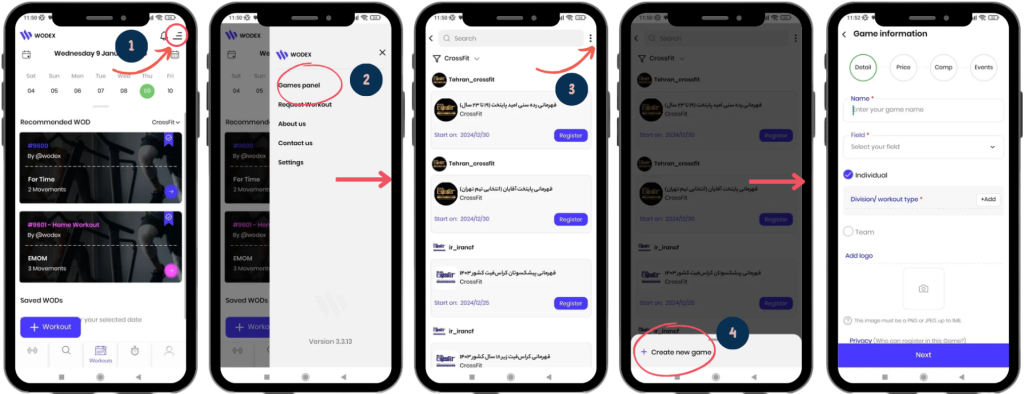
1) On the homepage, as shown in Image 1, tap on the menu icon located at the top right of the screen.
2) Select the Games Panel option to access the list of games.
3) On this page, you can view the complete list of games. To access the page for creating a new game, tap on the three dots icon at the top right of the screen.
4) Choose the Create New Game option.
How to Create a Game
Here are the steps for creating a game. The process consists of 4 sections:
Below, we will explain each section in detail:
1) Detail:
In this section, you must enter the details of the game in order.
It is important to note that filling in the fields marked with a red * is mandatory. Each section is
Name:
Game Name: Enter the name of the game in this section.
The maximum length for the game name is 40 characters.
Field:
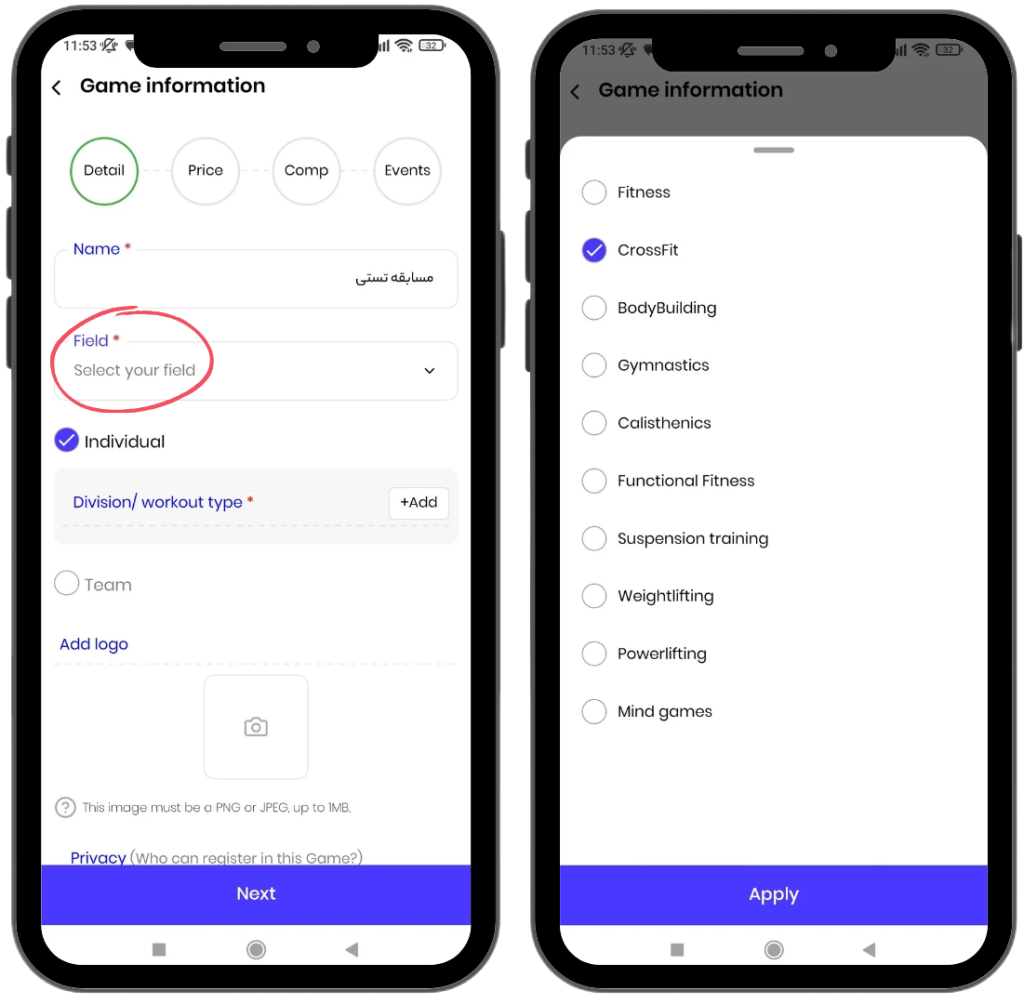
Sport Field: Enter the sport field for your game in this section, for example, CrossFit.
If your sport field is not listed, you can request to add it by sending an email to:
.
Game Type:
This section includes two categories: Individual and Team games.
Using the WODEX app, you can host your games as individual, team-based, or both simultaneously. To hold both individual and team games, make sure to select both checkboxes.
Details on how to fill out this section will be explained below:
Individual:
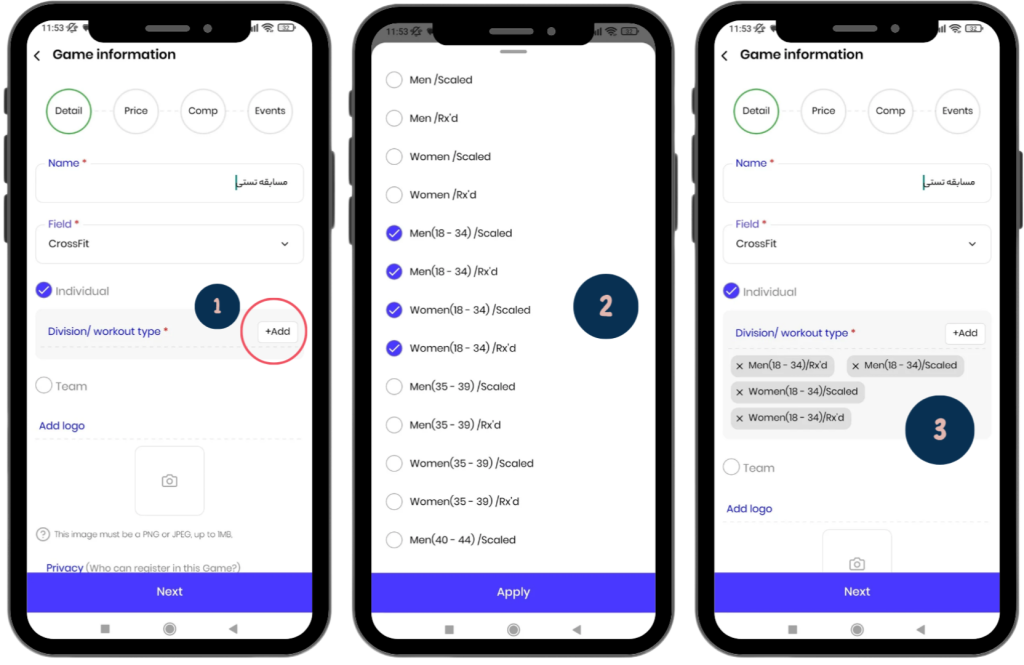
To Add an Individual Game:
- First, select the “Individual” checkbox (enabled by default).
- Then, choose the appropriate category for your game from the “Division/Workout Type” section. This includes gender, age group, and skill level.
- For better management, the selected categories will be listed on the page.
Team:
To Create a Team Game:
- First, check the “Team” option.
- Then, follow the steps below to complete the process of creating a team game.
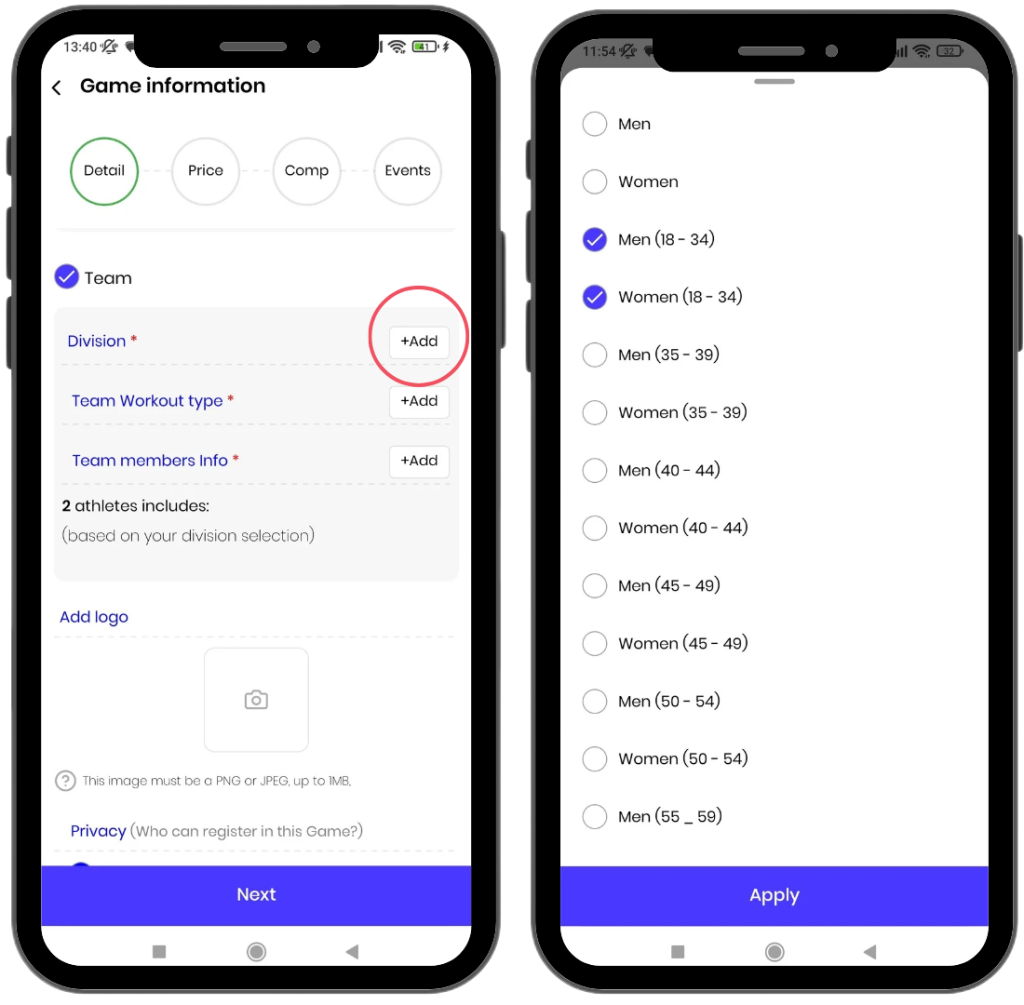
1) Division:
In this section, you need to specify the gender groups and age categories that each team can include.
For example, a team can consist of one male member aged 18–34, one female member aged 35–40, or any other desired combination.
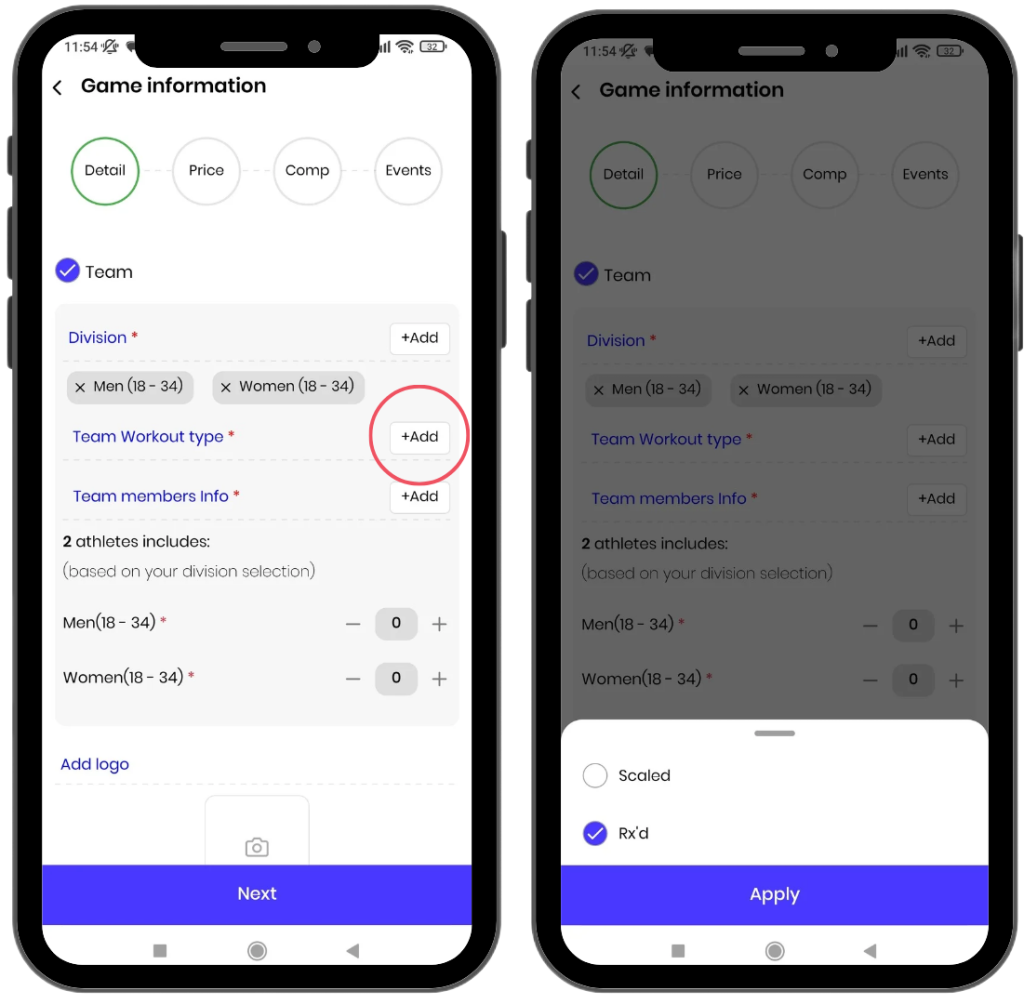
2) Workout Type
From this section, you need to select the game levels.
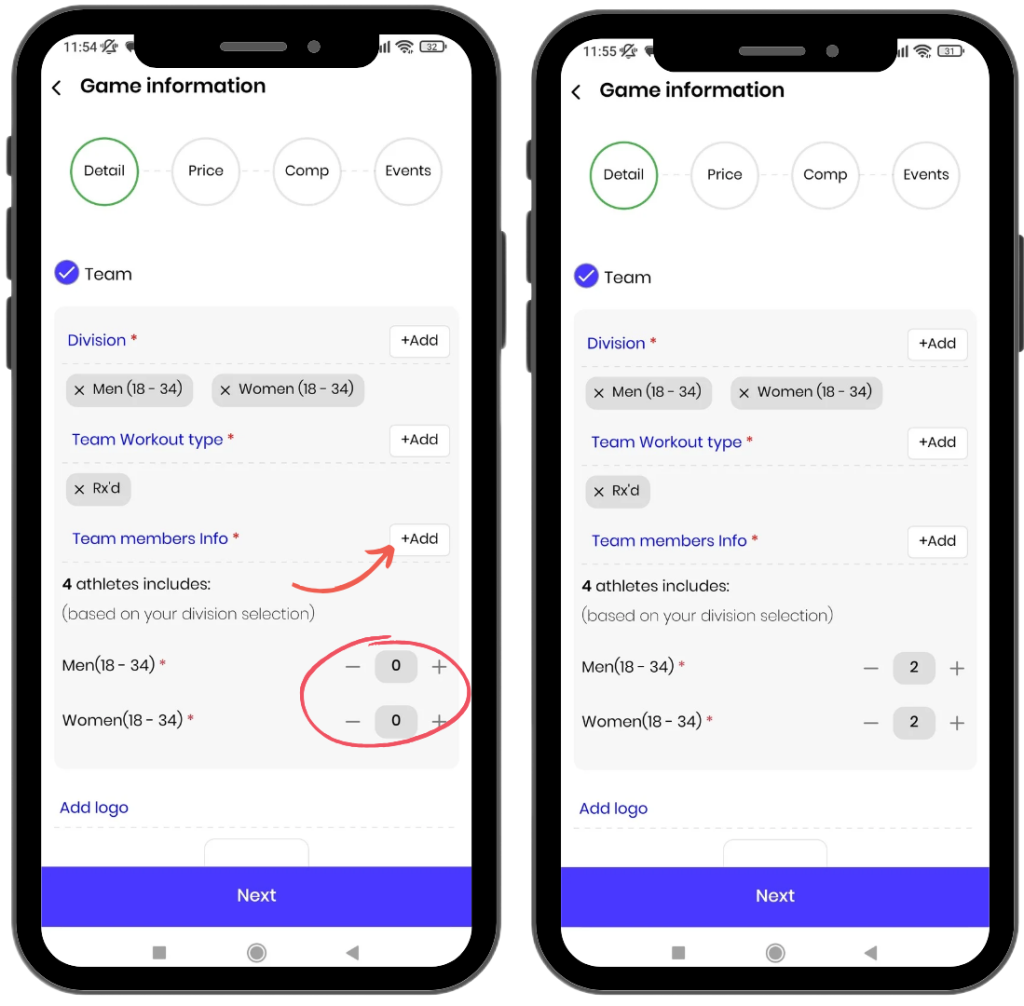
3) Team Members Info:
- From this section, you need to specify how many members each team should have. For example, teams of 3 members. The minimum number of members per team is 2.
- Next, you need to select the number of athletes for each category. For example, if you selected 4 members for the team, you need to specify how many athletes should be male aged 18-34 and how many should be female aged 18-34.
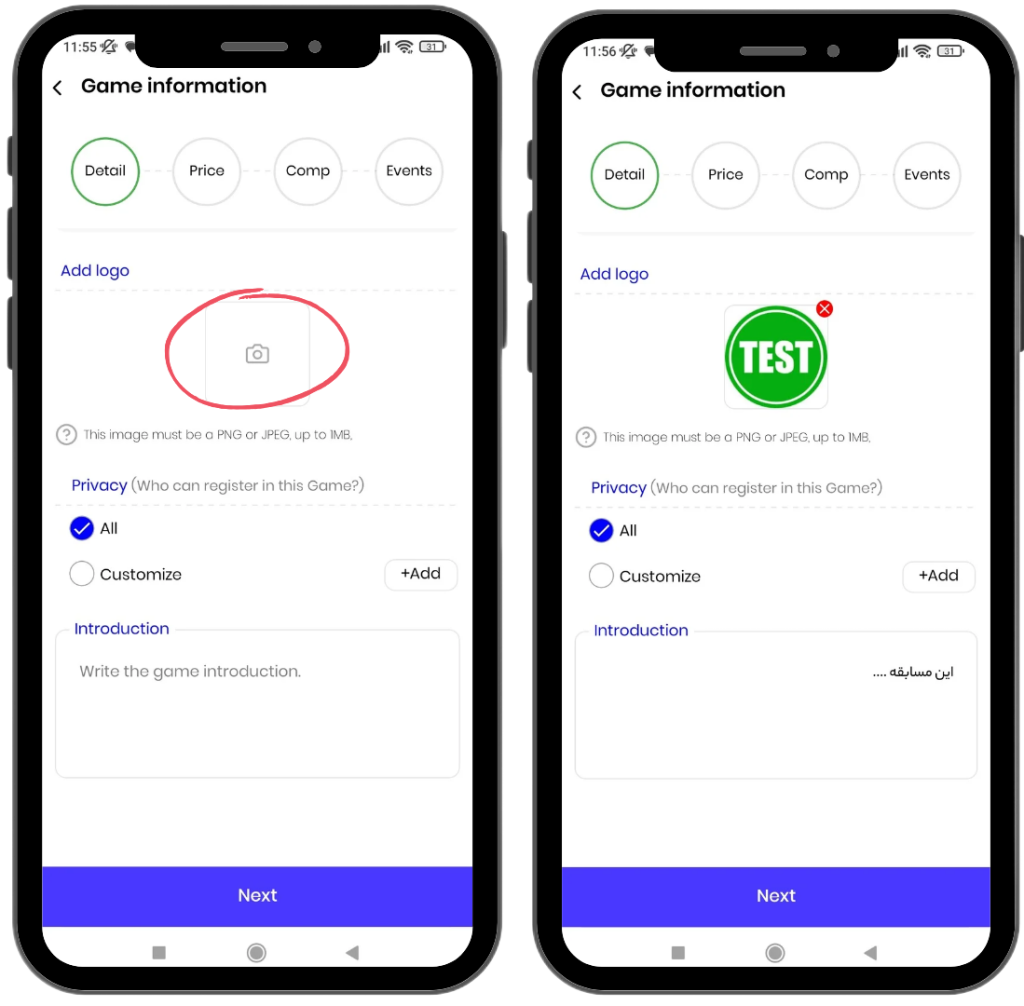
Add Logo:
From this section, you can upload the logo of the game.
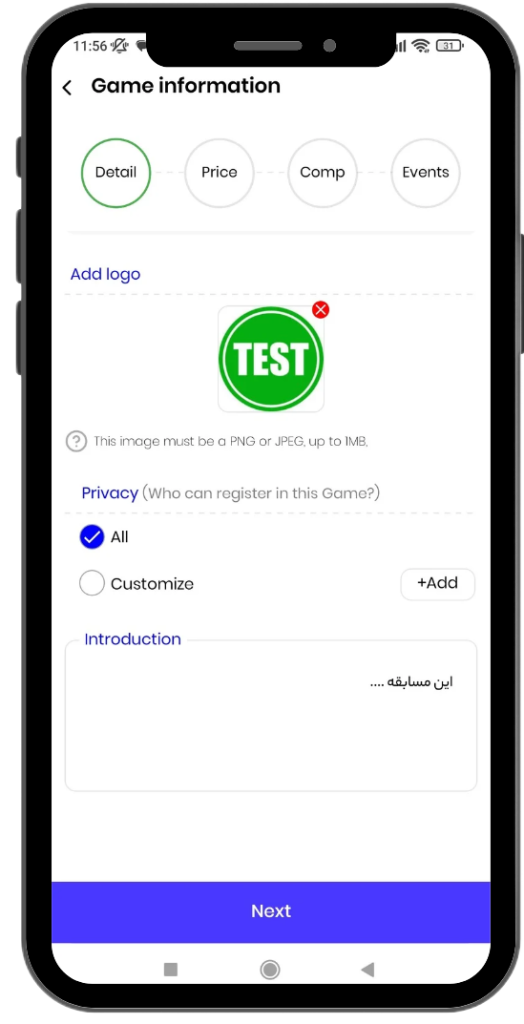
Privacy:
Privacy consists of two sections:
- All: By selecting this option, all athletes can participate in the game.
- Customize: By selecting this option, only athletes you add to the list can participate in the game. After selecting this option, you need to choose the WODEX usernames of the desired athletes. This option is suitable for hosting game among club members, friends, or family members.
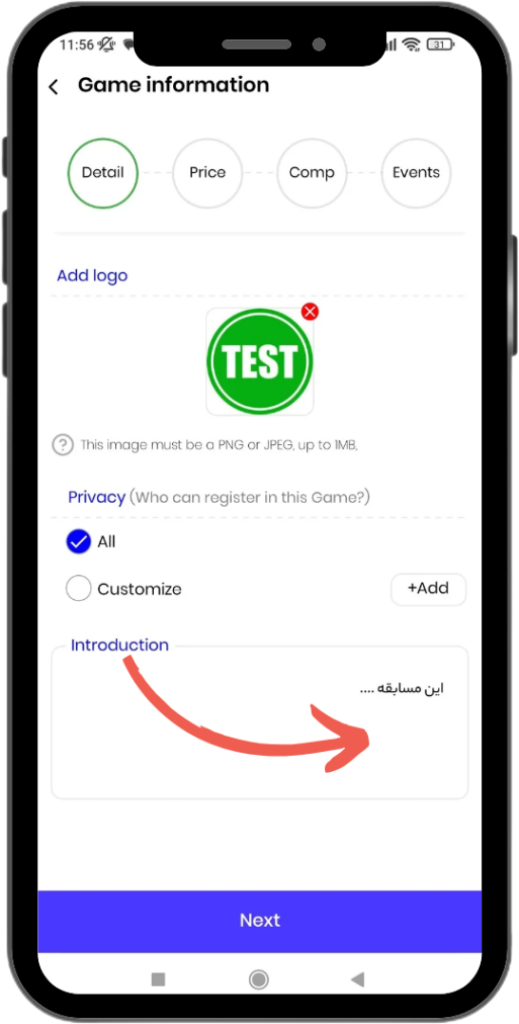
Introduction:
From this section, you can write the details related to your game.
For example, you can include the prize amounts or any other explanations.
2) Price
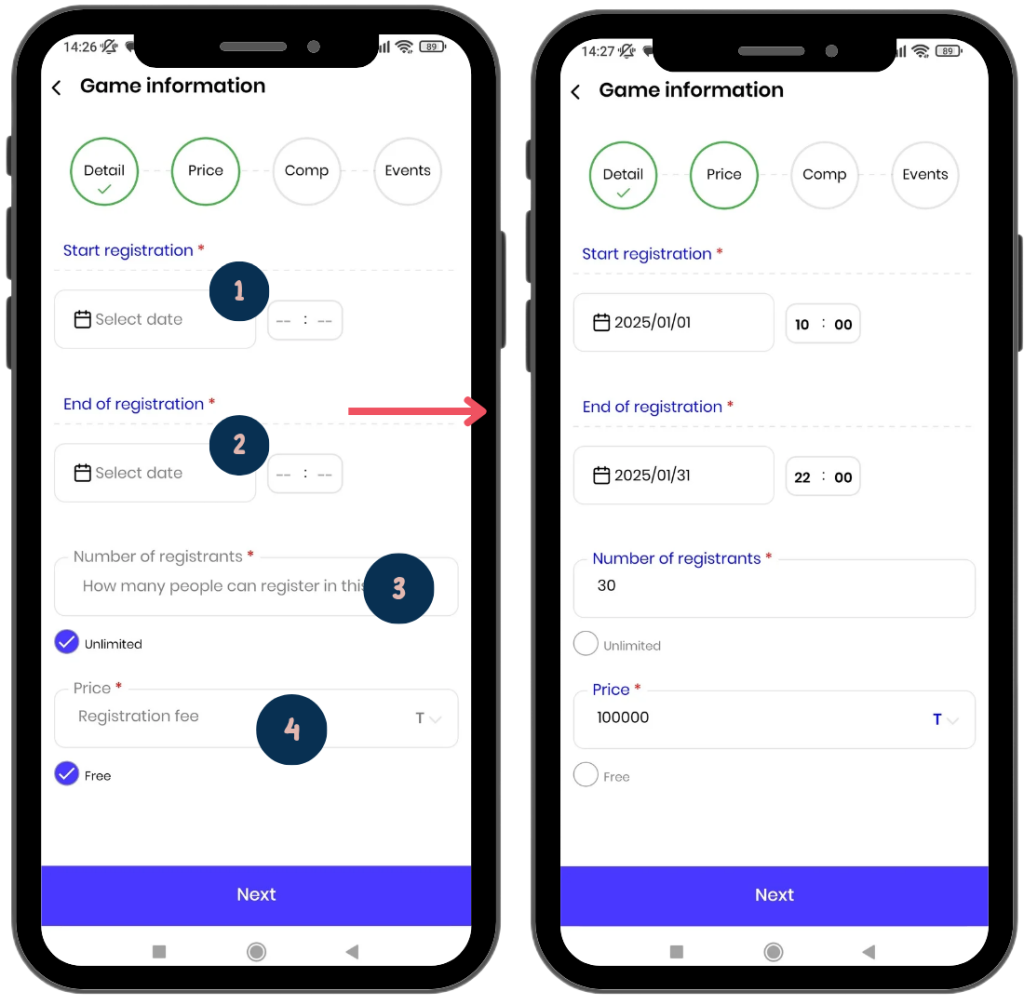
In this section, you need to enter the main registration settings for the game. The settings include the following:
- 1) Start Registration:
From this section, you can specify the date and time when registration will start. This time will mark the official start of the registration process for athletes. - 2) End of Registration:
Here, you must enter the date and time when registration will end. Athletes will only be able to register until this time; after this, registration will be closed.
3) Number of Registrations:
- By default, the “Unlimited” option is active, meaning there is no limit to the number of participants.
- To limit the number of participants, first disable the “Unlimited” option, then enter your desired number.
For example: If you enter 30, only 30 athletes will be able to register.
4) Price:
- By default, the competition is considered “Free.”
- To set a price, disable the “Free” option first, then enter your desired amount.
Note: You must also specify the currency. If no currency is entered, the game will be considered free.
These settings will help organize and streamline the registration process, assisting in better game management.
3) Comp
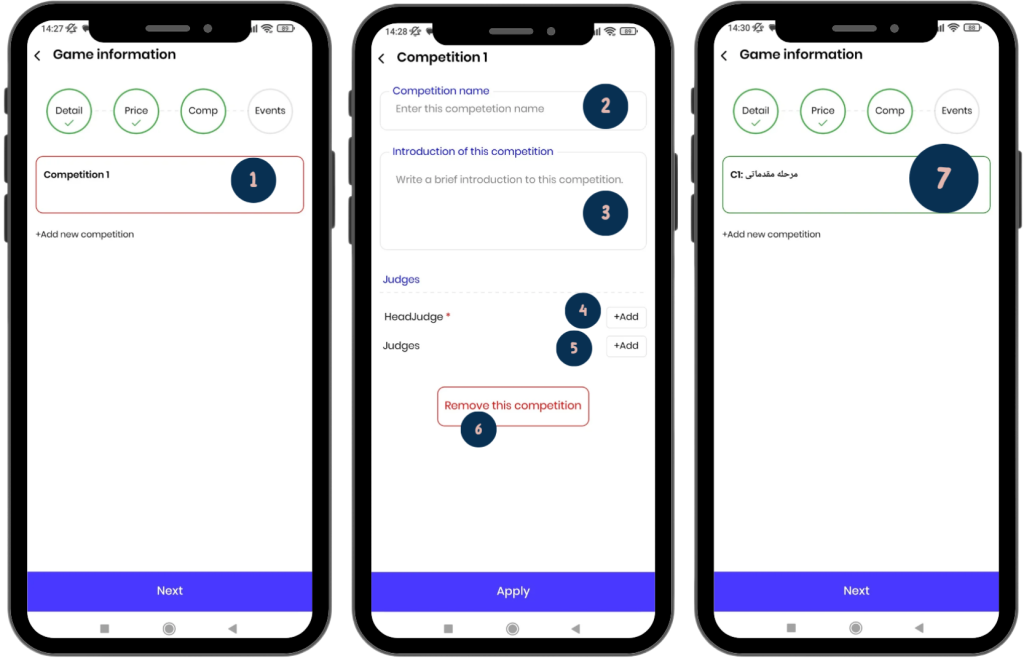
Adding Competition Stages
In this section, you need to define the stages of your competition.
What does a competition stage mean?
For example, you may want to organize a game with two competition: a preliminary competition and a final. The preliminary stage includes 5 events, and the top 10 athletes from this stage will advance to the final.
To create each stage, follow these steps:
1) Competition Stages:
If a section is highlighted with a red line (as shown in the image), this means the information for that section needs to be completed. To enter the details, click on it to go to the stage details page.
2) Comp Name:
Enter the name of the competition, such as “Preliminary.”
3) Comp Description:
Write a description of this competition.
4) Head Judge:
- At least one head judge must be assigned to each competition. This is done by searching for the head judge’s username and adding them. This step is mandatory.
- The head judge’s duties include assigning athletes to judges and overseeing their performance (see Competition Judges Guide).
5) Judges:
Add the judges for the competition in this section (see Competition Judges Guide).
6) Remove this competition:
Clicking this option will delete the selected competition. Keep in mind that at least one competition is required for creating the game.
Finally, click the Apply button to create the competition of your game.
Add new competition
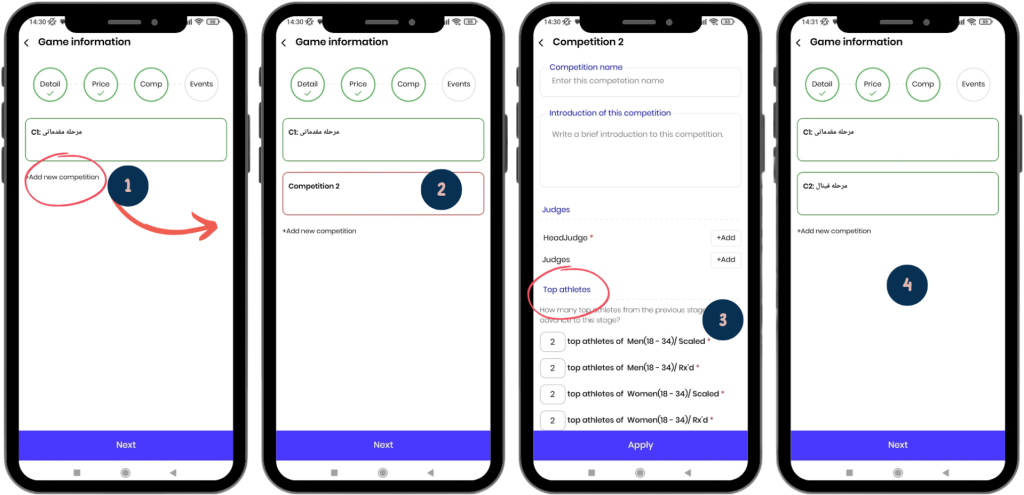
1) To create a new competition, click the Add new comp button.
2) competition 2 is highlighted in red and must be completed. To fill it in, click on it to go to its details page.
3) In this page, enter the necessary information. The only difference compared to the first competition is the Top Athletes section. In this section, you need to specify how many top athletes from the first competition can advance to the second competition.
4) Finally, by clicking the Apply button, the second competition will be created. You can easily organize various competitions, such as a Third Division League, Second Division League, and Premier League.
Events
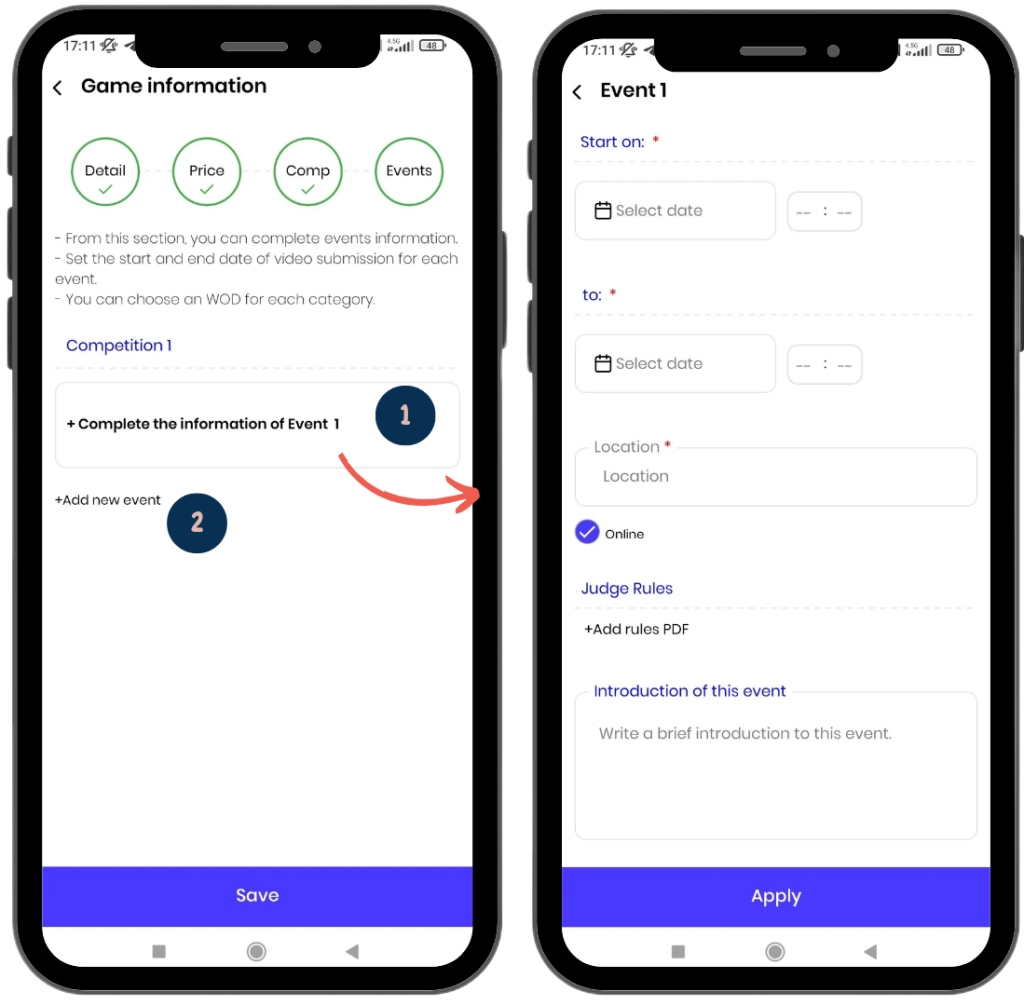
You can manage the desired events from this page.
- By clicking on the box of any event, you can access its details page.
- By clicking the Add new event button, you can add a new event.
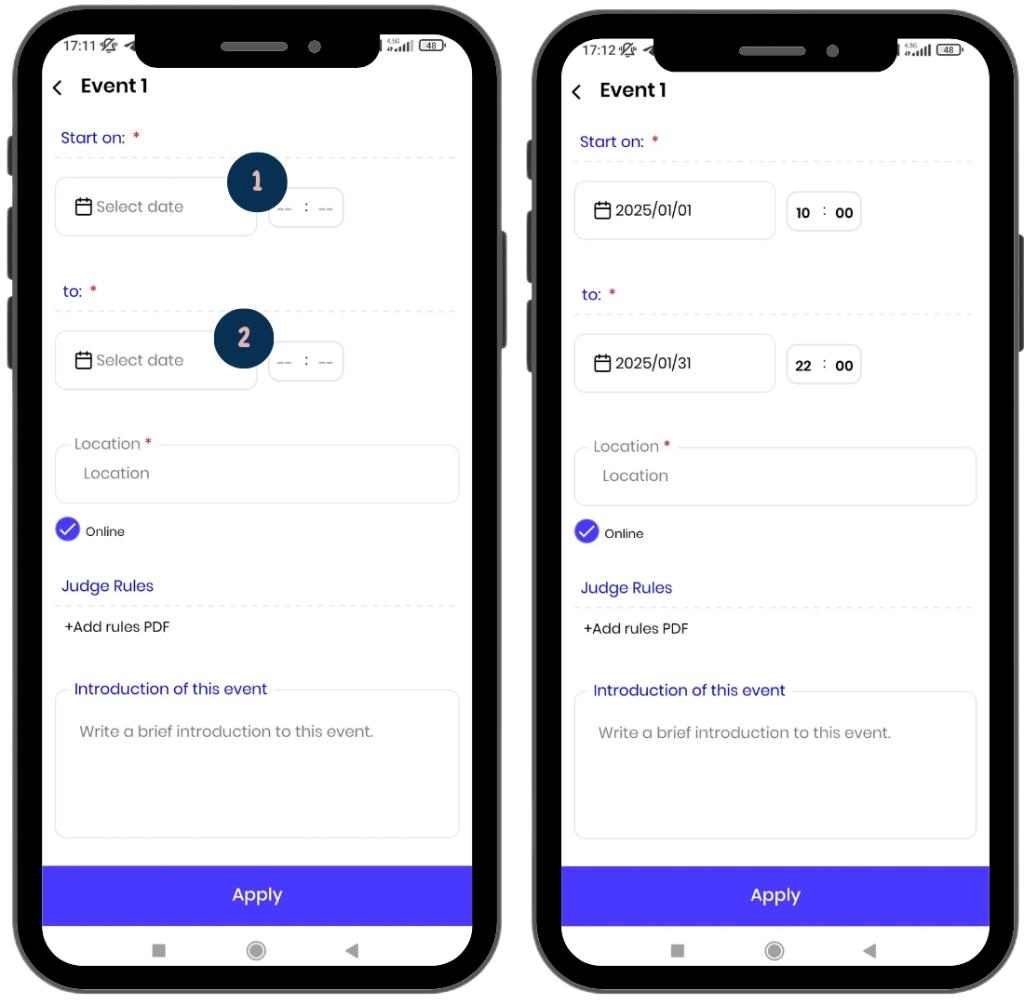
- From this section, you can specify the start time and date of the event.
- From this section, you can specify the end time and date of the event.
In online events, after the event’s end date, athletes will no longer be able to submit their videos.
After the event’s end date, athletes’ initial scores will be displayed on the leaderboard based on the information they have entered.
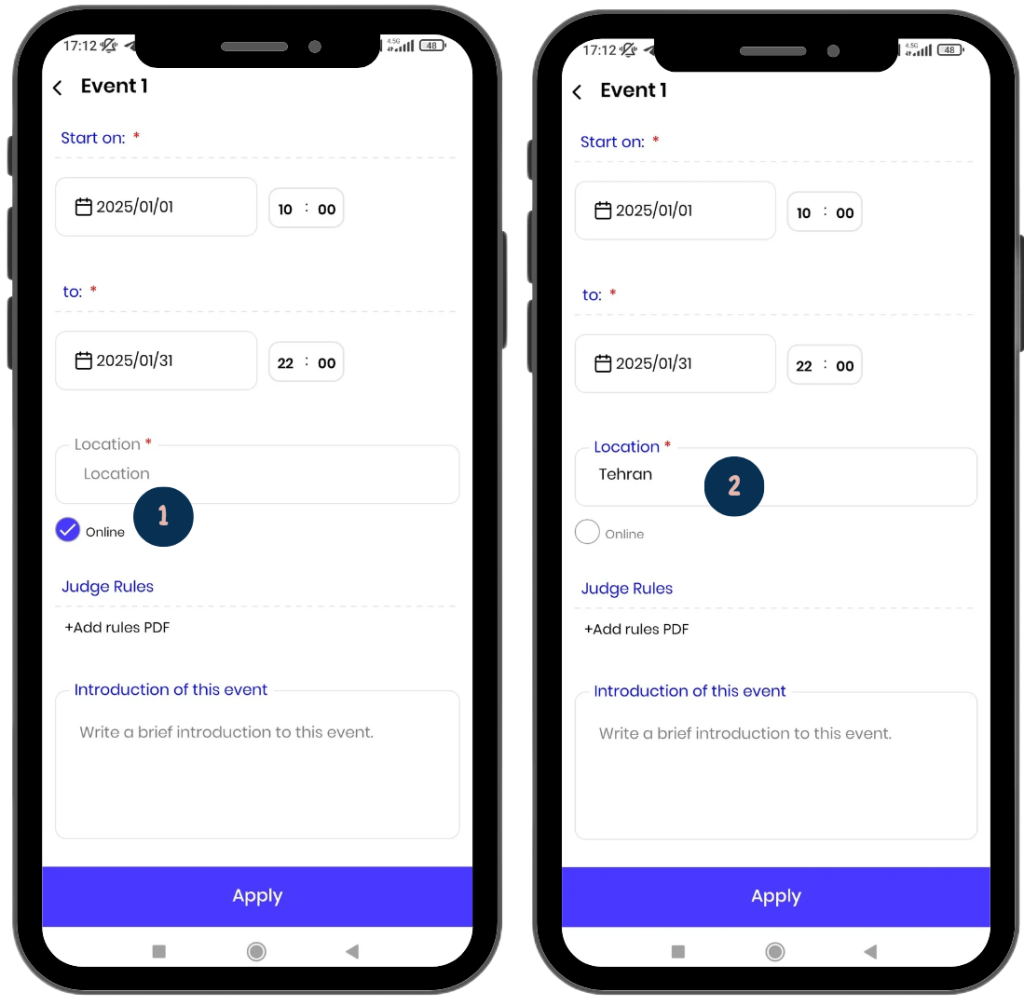
Online: By default, the online option is activated. In this case, athletes can submit their videos as soon as the event starts.
In-Person: To organize an in-person event, you need to enter the event’s location. Additionally:
- By selecting the in-person option, you can specify the number of heats, the number of lines available in each heat, and the timing for each heat.
- You will also be able to assign athletes to each line. This helps you manage your in-person event with a high level of organization.
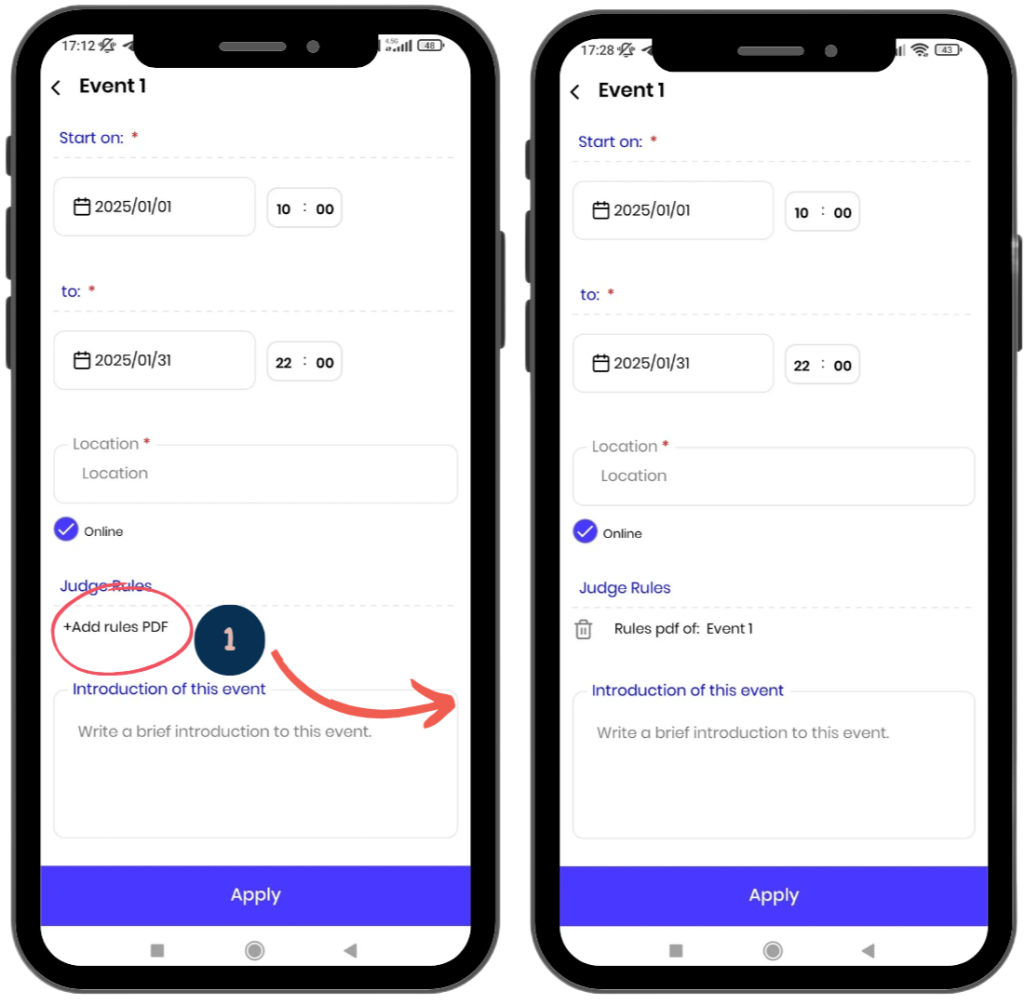
Judging Regulations:
From this section, you can upload the PDF file containing the rules and regulations for the competition’s events.
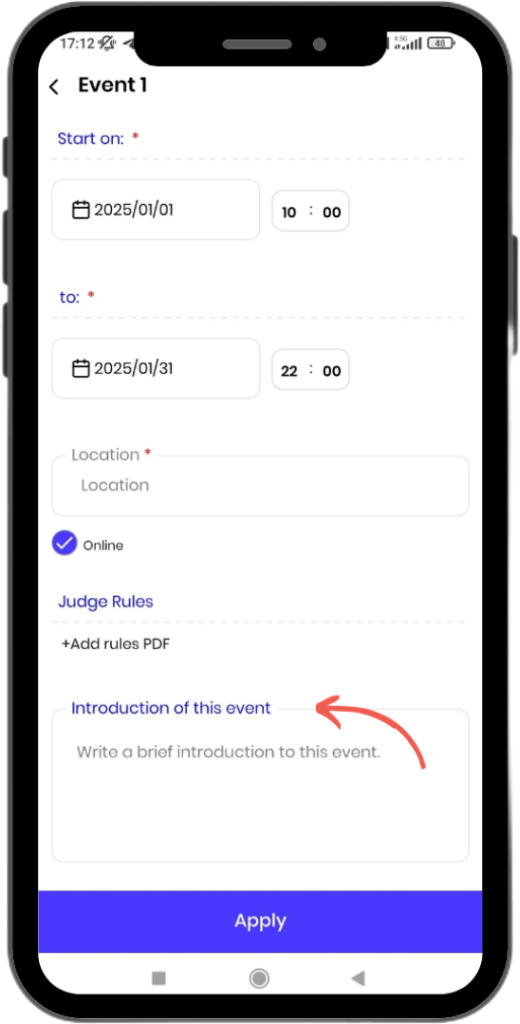
Event Overview:
In this section, you can write general information and descriptions about the event.
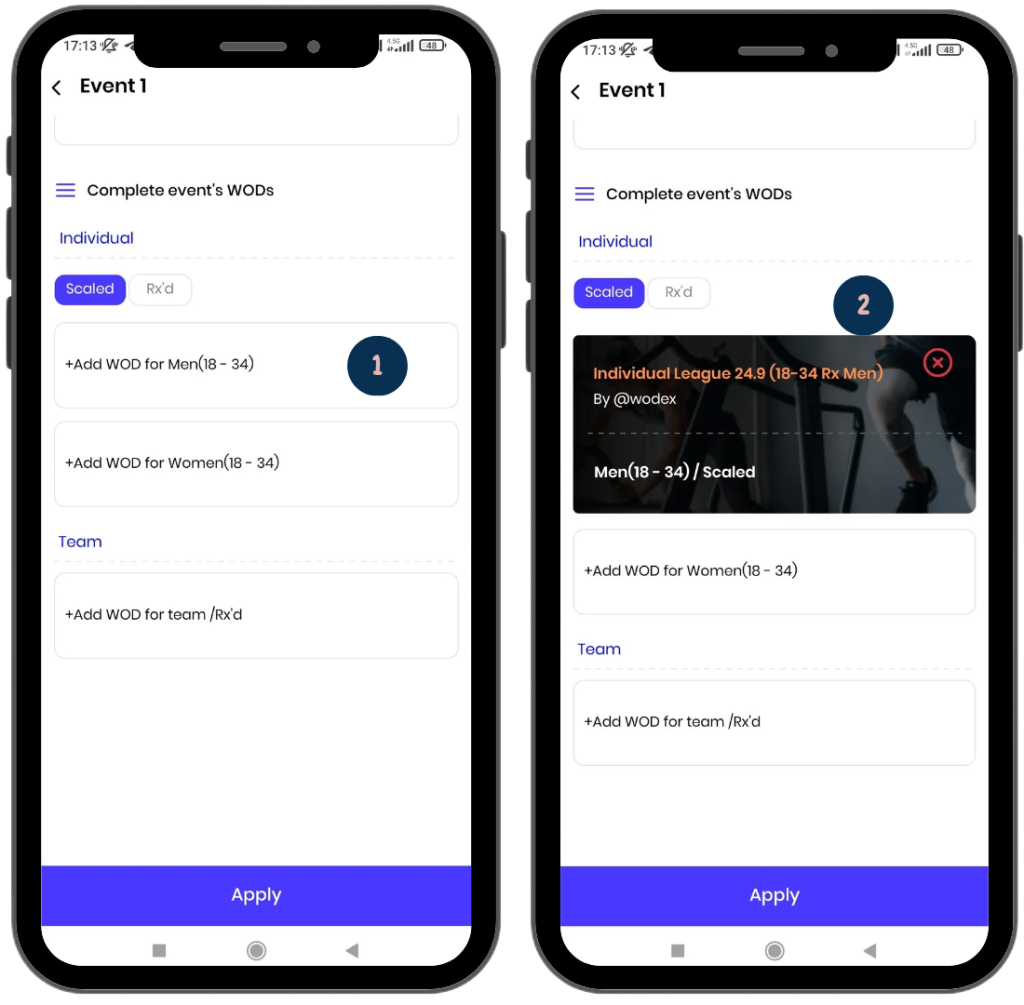
WODs for Each Category:
- All categories entered during the detail stage will be listed here.
- You can add the WOD for each category from this section.
- To do so, you must first create the WOD (see WOD creation guide).
Note: It’s not mandatory to register the WOD initially when creating the event. You can create the event first and add the WODs later. - By clicking on each age category box, you can search for and add the relevant WOD.
- Saving Information:
Finally, click the Apply button to save the information.
Editing a Created game:
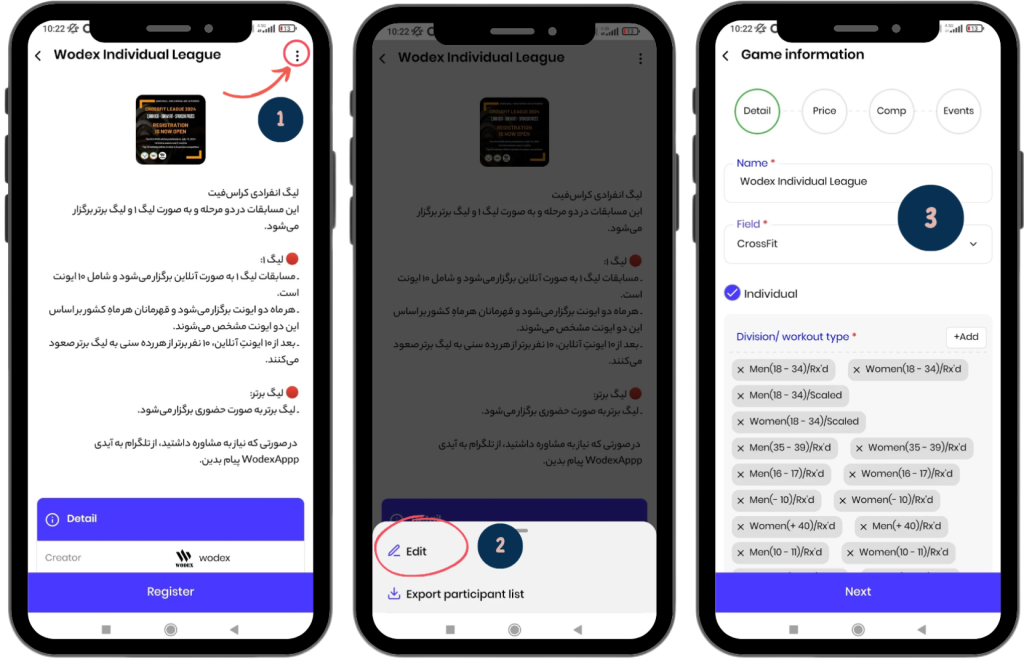
To edit a game, follow these steps:
- Click on the three-dot icon at the top-right corner of the page.
- Select the Edit option.
- In these pages, you can edit all items of the game.
Frequently Asked Questions
Yes, you can easily create and publish your competition for free.
All WODEX app users can create a competition. You can set up a competition among friends, family, club members, etc.
Yes, just select both “Individual” and “Team” options in the competition settings to hold both types at the same time.
The competition name will appear in the competition list, but only those you have granted access to can register for it.
All funds collected for the competition will be transferred to your account immediately after the competition ends.
Yes, you can modify the competition details by selecting the “Edit” option to update the schedule, judge list, or any other settings.
For more information, please refer to the head judge’s guide article.
For this, please refer to the Judge’s Guide article for detailed instructions on how judges can review and score the videos.
To register for competitions, please refer to the Competition Registration Guide article for detailed instructions.
You can view the leaderboard by selecting the “Leaderboard” option on the main competition page. For more information, please refer to the Leaderboard Guide article.
وAthletes can view the list of judges by selecting the “Judges” option. For more information, please refer to the Athlete’s Guide article.
Athletes must first upload their video to YouTube and then send the link through WODEX. For more information, please refer to the How to submit a video article.