How to Upload and Edit Video Information on YouTube
To upload a video to YouTube, you first need to have a YouTube account.
If you don’t already have an account, follow these steps:
How to Upload a Video to YouTube
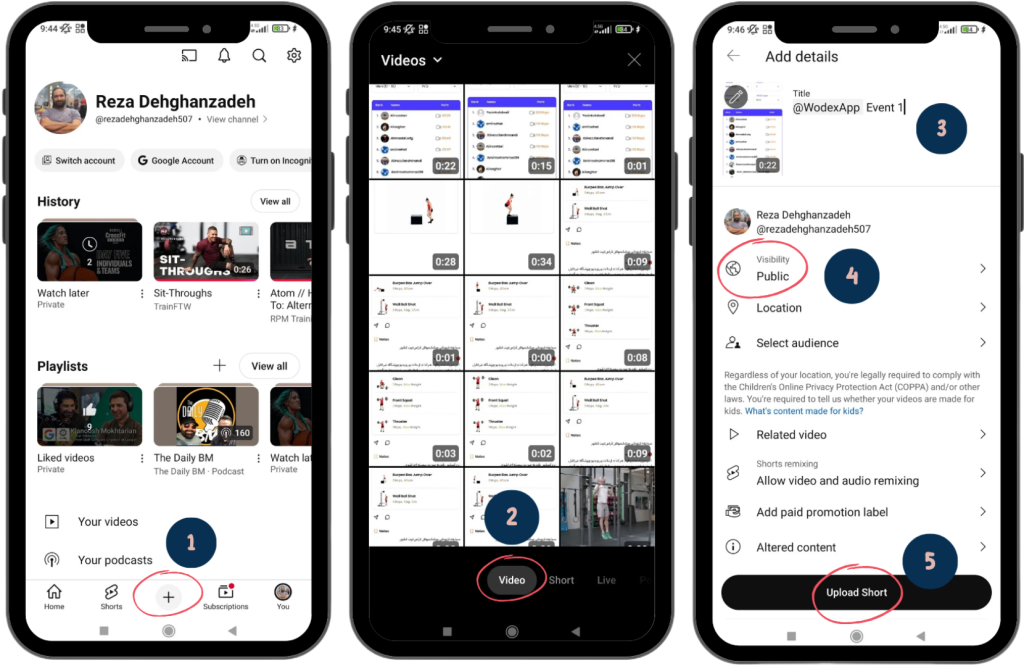
Step 1: Access the Upload Section
- Click on the + icon (as shown in the image).
- Note: If this icon is not visible, it means you haven’t created a YouTube account yet.
Step 2: Select the Video
- In the pop-up window, choose the video you want to upload.
- Tip: Ensure the selection mode is set to Video. If you choose Short, only one minute of your video will be uploaded.
Step 3: Add a Title
- Enter the title of your video in the Title section.
- Suggestion: To make your video easier to find, mention @WodexApp in the title.
Step 4: Adjust Visibility Settings
- Set the Visibility to Public.
- Important: If you choose Private, competition judges will not be able to view your video, and you will be disqualified.
- Note: If you notice after uploading that Visibility is set to Private, you can change it in the edit section (refer to the guide on editing video details).
Step 5: Final Confirmation and Submission
- Click on the Upload Short button to confirm and upload your video.
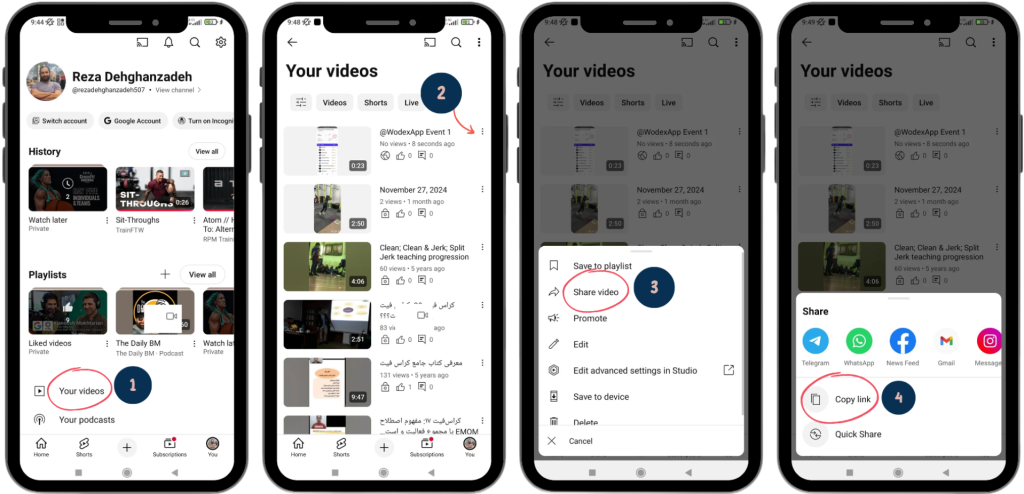
Step 1: Access Your Videos
- Select the Your Videos option.
Step 2: Choose the Video
- Click on the three-dot icon next to the video you want to copy the link for.
Step 3: Share the Video
- From the menu that appears, select Share Video.
Step 4: Copy the Link
- In the new window, click on Copy link.
- Your video link is now copied and ready to be used in the Wodex app.
(For more details, refer to the guide on “How to Submit a Video and Enter Scores in Wodex.”)
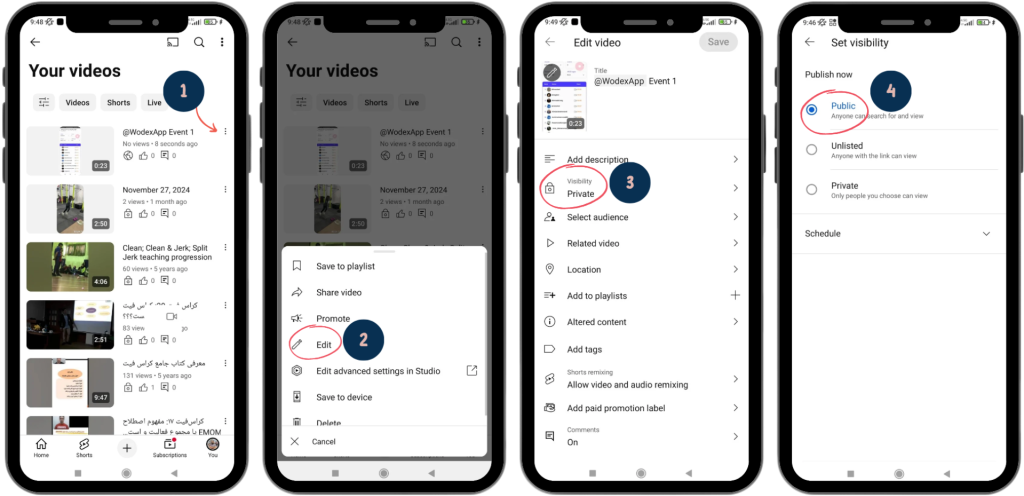
Step 1: Access the Edit Option
- Click on the three-dot icon next to the video you want to edit.
Step 2: Select the Edit Option
- From the menu that appears, choose Edit.
Step 3: Edit Video Information
- On the new page, make the necessary changes to your video details.
- Example: If the Visibility setting was mistakenly set to Private, you can change it to Public in this section.
Post Views: 329
Related Posts
1404-04-17 Games
Wodex League® 2025 Rulebook
Wodex League® is an annual athletic event designed to determine the fittest athlete of the year. The league follows a multi-stage structure that includes both online and in-person...
1403-12-19 CrossFit Workouts
CrossFit Workout: Sunday, March 09, 2025
CrossFit Workout: Sunday, March 09, 2025 This for-time workout emphasizes speed, power, and endurance.Thrusters, a combination of a front squat and push press, engage the entire body with a focus on...